In today's consumer-driven and fast-paced retail environment, quick customer service is a top priority. A billing management system should be fast, robust, and efficient enough to handle increased demand and ensure smooth customer checkout experiences.
Choosing the right billing management system can solve most billing challenges. Before exploring the checklist to choose the best billing management system, first learn what a billing management system is including its features and benefits, and why it is an essential tool for modern businesses.
What is a billing management system?
A billing management system is not just billing software but a complete ecosystem that allows businesses to handle the entire billing operation from invoice generation to payment collection. A billing management system helps retail businesses manage customers, simplify invoicing, track payments, and calculate taxes.
How does a billing management system work?
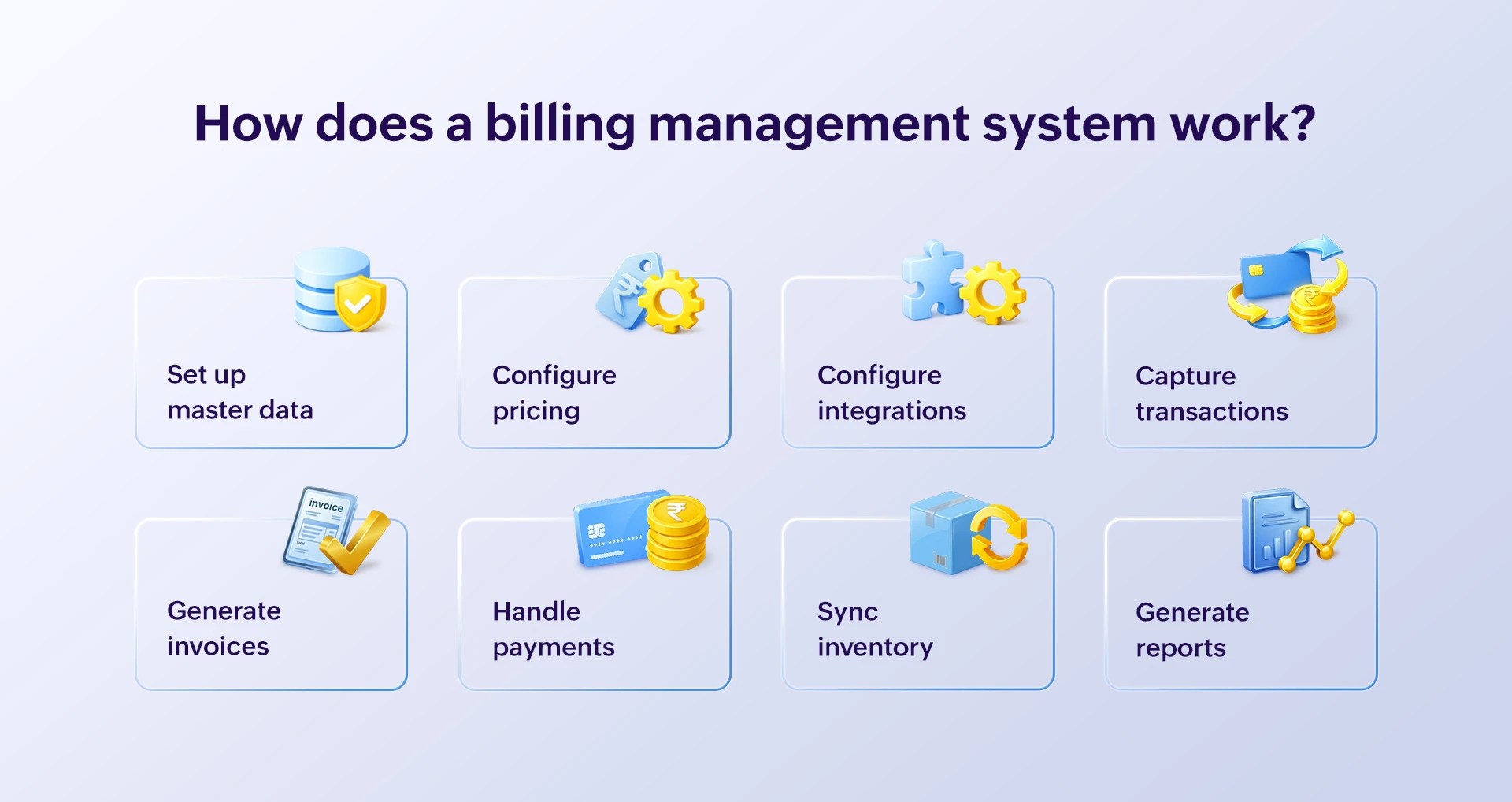
Billing management systems work in a structured approach that captures a sale transaction, calculates amounts based on rates, calculates taxes, generates invoices, records payments, and updates financial records automatically. It connects sales, purchases, inventory, CRM, accounting, and tax compliance into one streamlined process. Here is a practical billing management process in retail.
- Set up master data: First, masters for items, customers, suppliers and tax are set up in the system.
- Configure pricing: Pricing validations, tax rules, margin conditions, and discount limits are defined to ensure accurate billing.
- Configure integrations: Billing systems are integrated with required hardware devices and software needed for smooth business operations.
- Capture transactions: Each sale is captured in the billing software with items, quantities, prices, taxes, and customer information.
- Generate invoices: GST-compliant invoices are generated, and notifications are sent to the customer via SMS, WhatsApp, or email.
- Handle payments: The customer payments are collected using multiple choices and recorded in the software. The tax rates are automatically computed based on predefined conditions
- Sync inventory: The stock gets reduced from the system inventory automatically based on the billing quantity.
- Generate reports: The software generates various analytical reports based on different parameters that help make decisions during subsequent purchases.
Billing management systems vs. traditional billing methods
Operation | Billing management system | Traditional billing method |
| Billing | Completely digitized and mostly automated. | Highly reliable on manual inputs, reviews, and calculations. |
| Inventory | Updates stock automatically after each sale. | Stock should be updated manually and is mostly delayed. |
| Compliance | Generates tax compliant invoices, automates tax filing, and generates reports automatically. | Tax should be calculated for each item manually and needs to be tracked in sheets. |
| Security | Stored digitally in a secured database and can be retrieved anytime by authorized persons. | High risk of loss, damage, and misappropriation of bills. |
| Insights | Provides real-time insights on sales transactions, purchase trends, payment patterns, etc. | Data should be manually compiled and insights should be derived comparing different sources. |
Key features of a billing management system
- Super-fast billing: Generate tax compliant instant bills with applicable offers, discounts, and loyalty points; print bills in required templates, and send soft copies of bills instantly via SMS, email, or WhatsApp.
- Secured payments: Enable flexible payment choices for customers, track credit outstanding, generate credit notes, and provide payment gateway integrations for hassle-free payments.
- Real-time inventory sync: Ensure reliable inventory data and assured stock availability with real-time inventory sync after each sale. Manage multiple batches of items with expiry and damage tracking, configure low stock alerts, and reorder notifications to ensure complete inventory control.
- Analytical reports: Analyze and interpret data based on daily, weekly, or monthly reports for sales, purchases, and inventory to make important business decisions. Monitor profits, margins, and cash flow to take corrective action immediately.
- Tax compliance: Automate tax calculations for each item based on predefined slab rates and local tax regulations. Simplify tax filing with a simple JSON import, Tally integration, and tax summary reports using GST-integrated billing software.
- Data backup and security: Protect data with automated backup, avoid data misappropriation with role/user-based access controls, protect margins with approval mechanisms for important actions, and maintain audit trail logs.
Benefits of using a billing management system
- Enhanced customer experience: Using billing software ensures faster billing and reduced queues at counters, which establishes strong brand value in customers and keeps them coming back to your store.
- Increased inventory accuracy: Stock gets updated in real time once the bill is generated which helps track your current stock and make proper decisions on purchases and stock transfers on time.
- High employee productivity: With all data recorded in the system, any staff can perform billing. With reduced workload and execution time for billing, key employees can focus more on other revenue-generating activities in the store.
- Improved billing accuracy: Billing software reduces human errors in data entry, amount calculations, and tax computation, reducing returns and customer complaints.
- Better cash flow management: Real-time tracking of payments, credit outstanding, revenue, and profits helps plan purchases correctly, manage expenses better, and maintain positive cash flow in the business.
How to choose the best billing management system
There are many billing management systems on the market and choosing the right one for your business is based on specific parameters.
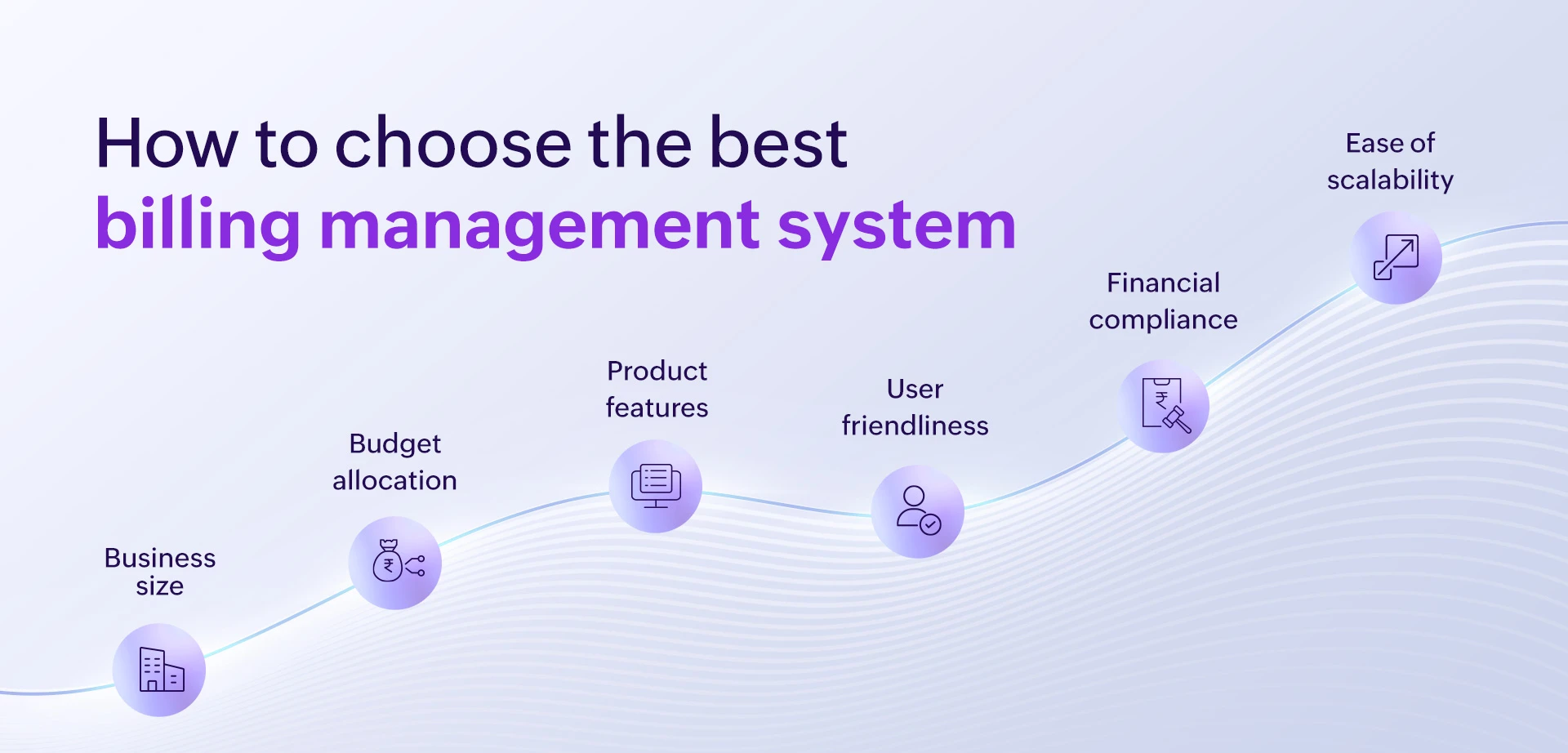
- Business size and budget: Smaller businesses with minimum budgets can use billing software without customization options while multi-store businesses can choose comprehensive billing management software.
- Features and capabilities: Evaluate if the software has features to handle sales, purchases, and inventory, CRM capabilities, built-in accounting, report generation, and supports required integrations. Choose billing software based on your business need and feature requirements.
- Ease of use and adoption: The tougher the UI and navigation, the harder it is for staff to learn, use, and adopt it. Choose billing software that has a simple UI, customizable shortcuts, and is easy to use with minimal training.
- Compliance and local regulations: Ensure the software supports local tax regulations, legal compliance, and industry standards. Choose a reliable and trusted billing software that is certified by a regulatory and industrial body.
- Ease of scalability: Billing management software should be easy to scale horizontally and vertically as the business grows, replicate the data setup for every new store, and kickstart operations immediately for hassle free operation.
Whatever your business need, size, and requirement, Gofrugal has solutions suitable for your business. Currently, over 8,000 retail customers ranging from small standalone stores to large retail chains across more than 75 countries trust Gofrugal to run their business efficiently. Learn why Gofrugal is considered the best billing software by customers.
Why is Gofrugal the best billing management system?
Gofrugal offers ERP solutions with a flexible deployment model (online billing software and offline billing software), comprehensive features, over 10 mobile apps, and supports over 75 business integrations, making it highly sought by retail businesses. Here are a few features that help businesses handle billing and inventory effortlessly.
- Uninterrupted billing: Ensure uninterrupted billing even during power failures or network downtime as the bills sync automatically in sequence once the network is restored. Support billing on multiple counters and different devices such as mobile, tablet, and computer at the same time without any hassle.
- Flexible integrations: Gofrugal integrates with various hardware such as POS devices and payment terminals, as well as third-party software for loyalty platforms, ecommerce platforms, payment gateways, and ERPs.
- Omnichannel experience: Omnichannel customer experiences enable customers to place orders from home, get orders delivered to their doorstep, and purchase items themselves with self-checkout counters. It allows customers to return or exchange items at any store, and redeem offers and loyalty points at any store, ensuring consistent shopping experiences.
- Restricted access controls: Enable user/role-based restrictions, ensuring only relevant staff can access the right information. It restricts key actions impacting margins such as editing bills, redeeming discounts, applying offers, updating prices, etc based on roles so data isn't altered. ISO 27001 certification for information security assures our commitment to data security.
- Retain and expand customers: Gofrugal's useful analytics on buying trends, best offers, frequently bought items, etc helps customize customer-wise offers, create kits, and generate more revenue. It configures loyalty points at each store based on need and sends bills to customers via SMS or WhatsApp to increase brand value and retain loyal customers.
With growing customer expectations for instant product experience and flexible shopping choices, billing management systems are no longer optional but a necessity for businesses. From quick billing to instant payments, real-time inventory syncs, and accurate tax compliance, billing management software turns inefficient operations into efficient processes and happy customer experiences. Take the first step towards smart, accurate, and fast billing with Gofrugal by registering for a free demo today.
Frequently asked questions
What is billing management?
Billing management is the process of creating, tracking, and managing all billing-related activities in business, from bill generation to payment collection, and report generation. It ensures every customer is billed accurately, each sale is recorded correctly, and transactions are stored safely for future analysis and reference.
Who can use a billing management system?
A billing management system can be used by any individual or business that sells products or services and needs to generate invoices, collect payments, and track revenue efficiently. Some examples of who can use billing management systems are:
- SaaS and subscription businesses like B2B software
- Professional service providers like law firms, agencies, consultants, telecom providers, real estate, NGOs, health care professionals, delivery services, etc.
- Retail stores like supermarkets, textiles, and pharmacies
- Wholesalers and distributors like FMCG distributors, stockists, and dealers
- Restaurants like cafes, bars, bakeries, cloud kitchens, dine-in and take-aways
- eCommerce like D2C brands, market place sellers, etc.
- Freelance and small businesses
What is the best billing management system?
There is no single best billing management system for everyone as the ideal choice depends on various factors like business size, location, industry, requirements, and more.
- Best for SaaS and subscriptions: Chargebee and Stripe
- Best for freelancers and solopreneurs: Zoho Invoice
- Best for MSMEs and small businesses: Vyapar, myBillBook, Zoho Books
- Best for medium to large retail businesses: Gofrugal ERP, Zoho POS
- Best for ecommerce and wholesalers: QuickBooks, Square, Zoho Inventory
- Best for enterprises: Zuora, Zoho One
What is the pricing structure of a billing management system?
The cost of billing software varies based on the billing model, features, country, vendor, industry, and similar factors.
For example, Gofrugal's retail on-premise software starts from a one-time cost of Rs.18,000 and retail cloud software starting at Rs.7,000 per year, per store. You can explore the detailed Gofrugal retail software pricing and plans to understand the options available for different business needs.
How can I download the billing management system for free?
You can download the billing management system for free by accessing the trial download available on the website. Start your free trial of Gofrugal’s retail billing management software to explore all its features for one month.