Key takeaways:
- Choosing billing software is not just about fast billing, it should support your retail category’s specific workflows like variants, batch tracking, serial numbers, and compliance.
- The right retail billing software improves stock accuracy, payment reconciliation, and real-time business visibility, helping prevent daily manual errors and cash flow gaps.
- Gofrugal’s retail-focused billing solutions are built for different store types, enabling category-specific operations, better control, and improved profitability.
The shop opens, the first customer walks in, and the day begins. Payments are coming from UPI, cards, and cash, and shelves need constant checking. A mix-up in stock or a slow billing system causes a small queue to form and suddenly the day feels hectic. Staff members are processing refunds, exchanges, and discounts, while you’re trying to keep an eye on sales, stock, and GST reports. Every pause, every mismatch, eats into your time and patience.
The right billing software could make all the difference here.
Choosing the right billing software isn’t just a tech decision, it’s the difference between a shop that runs itself and one that keeps you running behind it. Here are some tips on how to pick a billing system that actually works for your store daily.
How billing challenges in retail shops have changed today
Billing challenges have increased because modern retail requires faster checkouts, stricter compliance, precise stock tracking, and real-time visibility for owners.
- Customers expect instant digital checkout: UPI and card payments are now the default; any delay feels outdated.
- Compliance pressure is higher than ever: Small billing errors can now lead to uncomfortable questions and notices.
- Product complexity keeps growing: Multiple sizes, colors, variants, and frequent changes make tracking harder.
- Profit margins leave no room for mistakes: A single wrong bill or stock mismatch hurts more than before.
- Owners want answers immediately: Waiting for staff to prepare reports is no longer acceptable.
This is where many retailers first realize that billing issues are no longer operational problems, they are business risks.
What the “right billing software” means for a retail shop
The right billing software is one that keeps checkout smooth, data accurate, compliance intact, and owners informed without daily supervision.
- Fast checkout even during peak hours: Billing should stay quick and stable during rush hours, handling UPI, card, and cash payments without delays or system hang-ups.
- Accurate stock that matches the shelf:Inventory must update instantly after every sale, return, or exchange so owners always know what’s available and what’s stuck.
- GST billing without compliance stress: The system should automatically create GST-ready invoices and reports, reducing the risk of errors, notices, or penalties.
- Clear visibility into profit, not just sales: Owners should easily see margins, losses, and business performance without depending on staff or manual calculations.
- Seamless UPI reconciliation for faster and accurate billing: The software should support business growth while clearly matching each UPI payment to the correct bill, eliminating manual checks.
How to choose billing software for retail stores
The retail billing software should run smoothly every day keeping billing fast, compliance accurate, staff confident, and the business ready to grow. The choice should be based on how well the system fits real shop operations, not just feature lists or pricing pages.
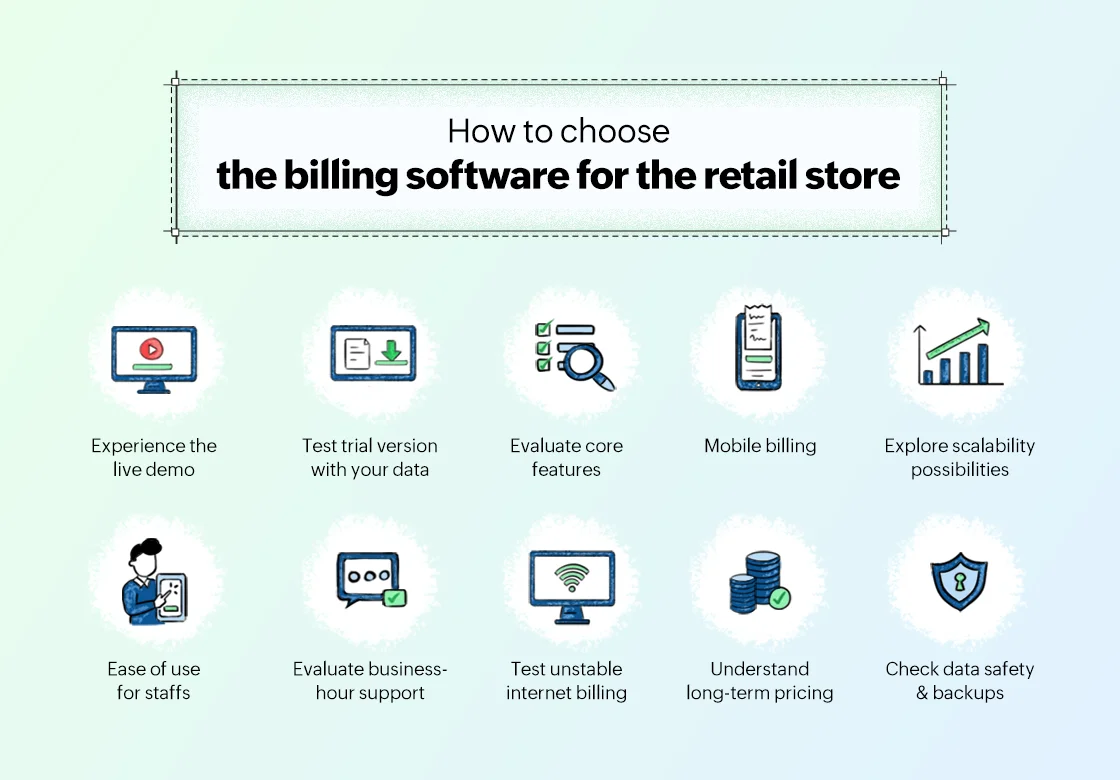
Start with a clear product demo to understand the workflow, then validate it through a real trial using your own data. That’s why solutions like Gofrugal offer both a guided demo and a live trial to help retailers see the system and experience how it performs inside their shop before deciding.
Start with a demo, then test during peak hours
A demo helps you understand the billing flow for your retail category, whether it’s loose items, variants, batches, or serial numbers. After that, test the system in your store during busy hours with real products to see how it handles queues, speed, and category-specific billing needs.
Check returns, exchanges, and discounts for real-world use
Different retail formats handle returns differently. Use the trial to test exchanges, partial returns, and discounts as they actually happen in your business, not in a generic setup.
Review GST reports generated from real bills
GST rules vary by product type and pricing structure. Instead of sample screenshots, verify GST reports created from live transactions in your category, ensuring they are filing-ready without manual corrections.
See if reports help you make daily decisions
Retail reports should reflect how your shop runs fast movers for supermarkets, size-wise stock for apparel, or expiry alerts for pharmacies. They should answer daily questions without exports, adjustments, or staff dependency.
Test how the system scales when you grow
Growth looks different across retail verticals. Ask how the system supports adding counters, categories, variants, or outlets without breaking existing workflows. The software should adapt as your business expands.
Observe how quickly staff adapt
When billing screens follow familiar, category-specific logic, staff learn faster and make fewer mistakes. During the trial, notice how confidently your team handles real billing scenarios.
Evaluate support during business hours
Retail-aware support matters. Ensure the support team understands your retail vertical and can resolve issues quickly when your shop is open, not after business hours.
Check data safety and automatic backups
Your inventory structure, such as variants, batches, serial numbers, or weight-based items, must be backed up accurately. Confirm data can be restored fully without losing category-level details.
Test billing when the internet is unstable
Whether you sell loose goods, medicines, or high-value items, billing should continue smoothly even when the internet connection drops, syncing correctly once connectivity returns.
Understand long-term pricing clearly
Pricing should reflect your retail format and growth path. Confirm costs for adding users, outlets, or category-specific features upfront to avoid surprises later.
One billing software cannot fit every retail business
Billing software must be built for your retail category, not forced to fit it. Each retail vertical runs differently, and software that ignores this can create daily workarounds, billing errors, and reporting gaps.
- Supermarkets need combo packs, loose item billing, weighing scale integrations, and fast-moving stock handling. Without this, billing slows and stock mismatches grow.
- Apparel and footwear stores deal with sizes, colors, variants, and tax-wise slab calculations. If the system can’t track variants cleanly, inventory accuracy suffers.
- Pharmacies require batch-wise tracking, expiry management, and compliance-ready billing. Missing this is not just inefficient—it’s risky.
- Electronics and mobile stores need serial number tracking, warranty management, and easy handling of high-value items. Generic billing systems fail here quickly.
- Other specialty retailers like jewelry, furniture, or hardware stores, have their own pricing logic, measurements, and stock complexity that demand category-specific workflows.
This is why choosing the retail billing software that support verticals out of the box is crucial. Solutions like Gofrugal are designed with vertical-specific billing and inventory logic so retailers don’t have to adjust their business to suit the software—the software adapts to the business.
Common mistakes retailers make while choosing billing software
Many retailers pick the wrong system because they focus on price, demos, or features instead of real store needs. This leads to poor usability, regret, extra costs, and operational issues.
- Choosing the cheapest option: Low cost often means it is missing key features, has weak support, or receives limited updates. When surveyed, 49% of retailers regret software purchases due to missing features. Source: Capterra, 2024
- Buying based only on demos: Demos show ideal workflows but rarely reflect peak-hour billing, returns, or mixed payment scenarios.
- Ignoring after-sales support: Billing issues happen during shop hours. Poor support delays fixes and increases errors. Data showed 36% of retailers cite training challenges and 31% cite poor tech support as reasons for regret.
Source: Gartner, 2024 - Not planning for future growth: A system that works for a single counter today may struggle when you add more counters, new outlets, or integrate loyalty and inventory systems. Upgrading or migrating later can be costly and disrupt daily operations.
- Choosing software staff can’t use: If your staff find the system confusing or slow, billing errors increase, queues get longer, and staff avoid using key features. Simple, intuitive software keeps transactions smooth and staff confident.
10-point checklist to evaluate billing software before buying
The right billing software should handle real store pressure, stay compliant, remain easy for staff, and scale securely as the business grows. Use this checklist to evaluate software in real conditions instead of relying on features listed in brochures.
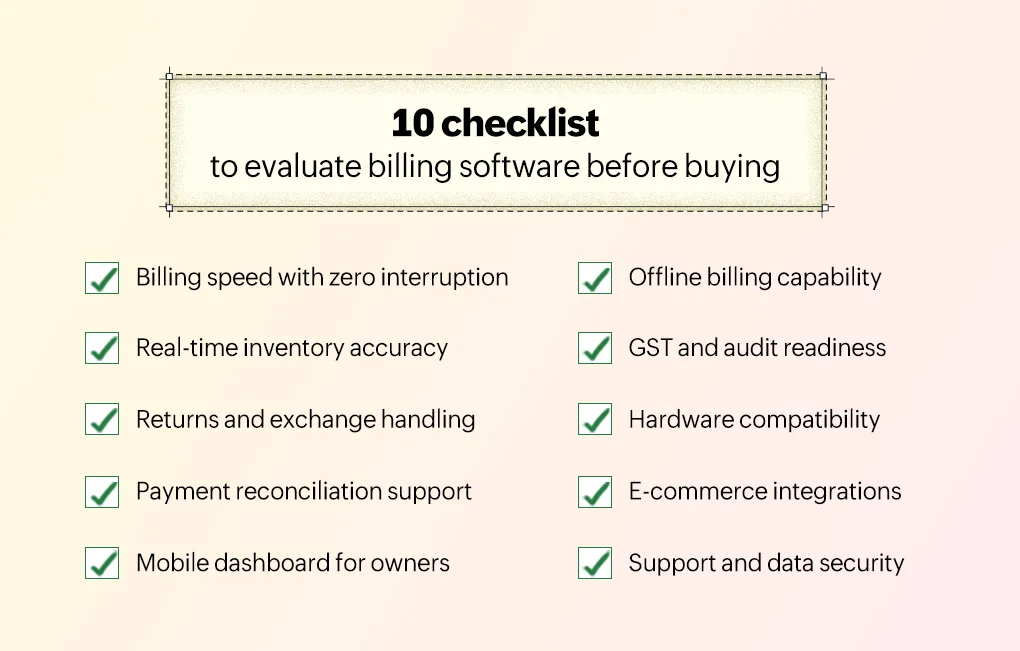
- Billing speed with zero interruptions: Billing must stay fast during rush hours, even with many items, discounts, and mixed payments. Any lag or hang slows queues and costs sales.
- Offline billing capability: Billing should continue even when the internet is slow or down. Once the connection is back, data must sync automatically without manual work or loss.
- Hardware compatibility: Software should work smoothly with barcode scanners, printers, weighing scales, and POS devices. Hardware issues force manual billing and increase mistakes.
- GST and audit readiness: GST invoices and reports should be auto-generated with correct HSN and tax calculation. Manual GST corrections increase compliance risk and filing stress.
- Real-time inventory accuracy: Stock must update instantly after every sale, return, or exchange. What the system shows should match what’s on the shelf.
- Returns and exchange handling: Returns and exchanges should be quick and straightforward. Partial returns, price differences, and refunds must work cleanly across payment modes.
- Payment reconciliation support: Each UPI, card, or cash payment should clearly match its bill. The system should remove the need to check payment apps or bank messages.
- Ease of use for staff: Staff should learn billing quickly and work confidently. Simple screens and steps reduce errors and speed up checkout.
- Mobile dashboard for owners: Owners should check sales, stock, and key reports from their phone anytime. Daily decisions shouldn’t depend on calling the store.
- Growth readiness and data security: The system should handle more counters, users, or outlets as the business grows. Data must stay secure and backed up without extra effort.
Why Gofrugal works well for retail businesses
If you want billing that just works, stock that’s accurate, and reports you can trust, Gofrugal is built for that. Gofrugal doesn’t just manage billing; it runs with your shop. It keeps counters moving, stock accurate, GST stress-free, and you in control to focus on growing your business, not babysitting software.
- GST and compliance handled: Invoices, HSN codes, GST reports are all automatic. No more last-minute stress or worrying about mistakes that could invite penalties.
- Super-fast billing, even when it’s busy: Rush hour? Sale season? No problem. Billing stays smooth, multiple items and mixed payments go through instantly, and queues keep moving.
- Control in your hands: Check sales, stock, and reports anytime, anywhere from your phone. You can make quick decisions without waiting for staff to update you.
- Works for any size store: Whether it’s a single shop or a franchise, Gofrugal adapts. Small stores get simple, smooth operations; franchises get central control without headaches.
- Ready for growth: Adding counters, staff, or new outlets is easy. You get consolidated reports and a clear view of every store, all in one system.
- Support you can rely on: Problems happen, but support is ready when you need it. Billing errors, payment questions, hardware issues, and more get fixed fast, without slowing down your shop.
Choosing billing software today is not about upgrading a system, it’s about protecting daily operations and future growth. When billing runs smoothly, stock stays accurate, and reports are reliable; the business feels under control. Before making a long-term decision, it’s worth experiencing how a system performs with your actual data, staff, and rush hours. That experience matters more than promises.
Frequently Asked Questions:
What features should retail billing software have in 2026?
Retail billing software should offer fast checkout, real-time inventory updates, GST-compliant invoicing, multi-payment support (UPI, cards, wallets), and insightful business reports. It should also support offline billing, multi-outlet operations, mobile dashboards, and easy returns/refunds. Integrated payment reconciliation and variant tracking (sizes, colors) are becoming essential for modern stores, too.
Is cloud-based billing software better than on-premise software for retail stores?
Cloud-based billing software is generally better for retail because it delivers real-time data access, automatic updates, secure backups, and remote visibility. It reduces hardware dependency and lets owners check sales or stock from anywhere. On-premise systems may still work offline, but cloud systems offer better scalability and lower maintenance costs.
How important is inventory management in retail billing software?
Inventory management is critical because accurate stock tracking directly affects sales, reorder decisions, and profitability. A good billing system updates inventory instantly after every sale, return, or exchange. This prevents stockouts, overstock situations, and mismatches between physical shelves and system records.
Can billing software integrate with POS systems and other retail tools?
Yes, billing software can integrate seamlessly with POS systems, barcode scanners, weighing scales, payment terminals, loyalty programs, and accounting tools. These integrations eliminate manual entries, reduce human errors, and ensure consistent data across all retail operations.
How much does retail billing software cost in 2026?
Retail billing software pricing in 2026 varies based on features, scale, and deployment type. Cloud-based solutions typically charge a monthly or yearly subscription, while on-premise systems may have a one-time license fee plus maintenance costs. Prices also depend on user count, outlets supported, and additional modules like inventory or analytics.
Can Gofrugal’s billing software manage multiple stores or franchise locations?
Yes, Gofrugal’s billing software supports multi-store and franchise operations with centralized reporting, stock synchronization, and flexible user controls. Owners can view sales, inventory, and performance across all outlets from a single dashboard, making it ideal for growing retail businesses.