How to enable barcode and weight-based billing in a single POS system?
Enabling barcode and weight-based billing in one POS isn’t just a feature; it’s essential for modern retailers who sell by both unit and weight. Learn how to set up a unified POS that handles both accurately, efficiently, and with minimal effort.
Access Gofrugal ERP
Highly rated and trusted by customers!








Key features
Key takeaways:
- Retailers today need a single POS that supports both barcode and weight-based billing to manage diverse products and reduce checkout errors.
- Accuracy and efficiency come from using barcode-enabled weighing scales, automating data syncs, and clearly defining item billing logic in the POS.
- Gofrugal ERP simplifies barcode and weight-based billing with direct scale integration, mobile POS, and real-time reporting — no third-party tools needed.
Challenges in managing barcode and weight-based billing in retail POS systems
Retailers today face unique billing challenges when selling products by both unit and weight. Without the right POS setup, it can lead to billing errors, slower checkouts, and lost revenue.
- Handling mixed billing methods in one POS: Most POS systems struggle to handle transactions that include both unit and weight-based items, causing billing delays and errors at checkout.
- Errors in weighing and barcode interpretation: Inaccurate barcode formats, misreads, or scale mismatches lead to pricing errors and missed items without real-time syncing, damaging revenue and trust.
- Lack of customization and integration: Limited support for diverse scale types and barcode formats across categories like groceries or fashion results in poor scalability and inefficient billing.
10 smart ways to set up barcode and weight-based billing in one POS system
Setting up barcode and weight-based billing in one POS system can boost billing speed, accuracy, and customer satisfaction. Here are 10 proven strategies to help you handle both billing methods seamlessly within a single platform.
1. Use barcode-compatible weighing scales
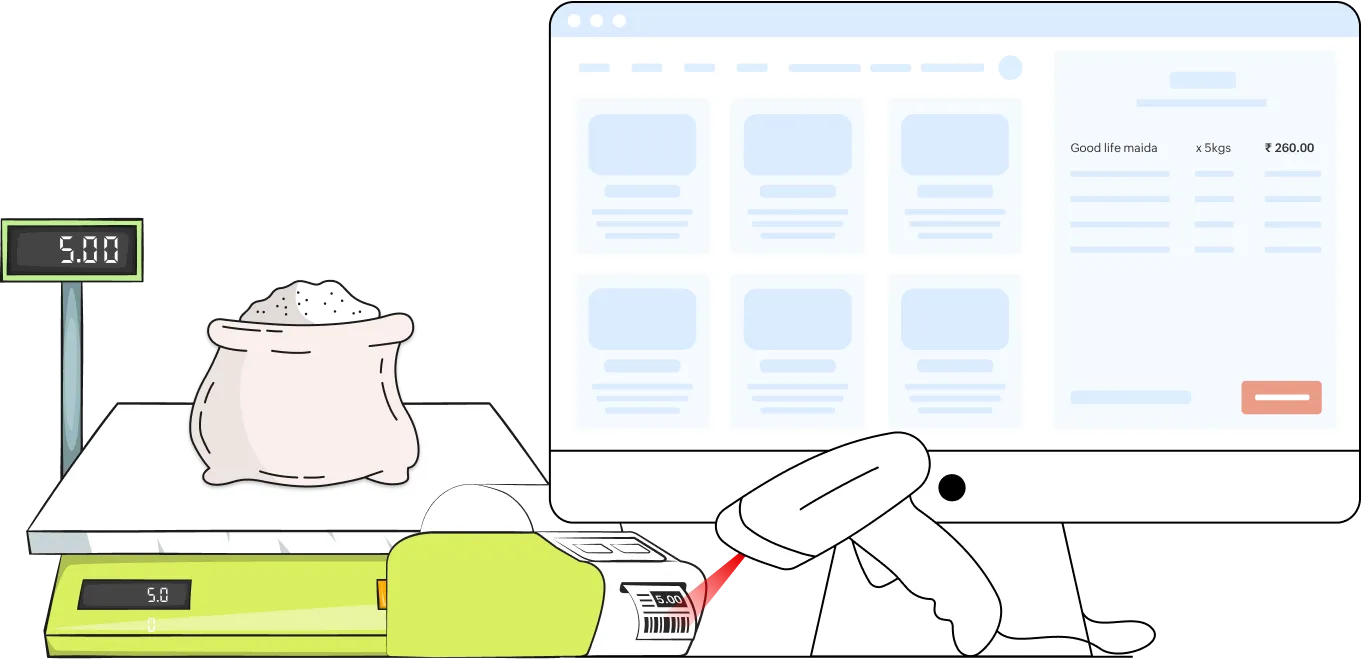
- Choose digital weighing scales that can print barcodes with embedded weights or prices. These barcodes are scanned by the POS to fetch the exact billing amount automatically.
- Make sure your POS system supports direct communication with the scale for real-time reading.
- Avoid manual weight entries by using certified, POS-integrated scales that ensure accurate and fast billing, which reduces errors and speeds up checkouts.
2. Define a clear barcode structure
- Use a consistent barcode format that includes all key details like item code, weight, and price.
- Follow industry-standard formats such as PLU codes for weight-based products or price data to ensure easy POS decoding.
- Use fixed barcode structures across SKUs to prevent scanning issues and misinterpretation at checkout.
3. Segment products by billing logic
- Classify products in your item master as unit-based (by count) or weight-based (by grams/kg) to define billing behavior.
- Assign billing logic in the POS item master based on weight or unit to simplify inventory tracking, billing, reporting, and even pricing, especially for mixed-basket purchases.
- Streamline your billing screens and reports by enabling logic-based categorization to reduce checkout complexity.
4. Integrate scales with POS software
- Directly connect your weighing scale with the POS system so weights are captured and billed instantly without switching screens or re-entering data.
- Enable automatic item detection and real-time weight capture when an item is placed on the scale, ensuring accurate billing with zero delays.
- Choose POS software that supports plug-and-play integration with leading weighing scale brands, avoiding the need for external middleware or complex custom setups.
5. Enable mobile billing via app
- Deploy POS mobile apps that support barcode scanning and mobile checkout.
- Empower staff to handle billing during rush hours, scan pre-weighed items directly in the aisle without additional hardware.
- Accept weight-based items from a mobile POS to reduce crowding at billing counters and enhance speed.
6. Standardize item master configuration
- Centralize the configuration of UOMs (units of measure), barcodes, and billing rules in your item master for consistency.
- Ensure every weighable item has correct mapping to barcode format, pricing logic, and product attributes.
- Sync the item master regularly across all billing counters and weighing scales to avoid version mismatch.
7. Train staff on dual billing methods
- Provide training to billing staff on handling both barcode scanning and weighing scale operations.
- Teach them how to process mixed carts with unit and weight items seamlessly.
- Set up role-based access or guided alerts to minimize errors and improve customer checkout experiences.
8. Implement pre-packaging for high-volume items
- Pre-weigh and label fast-moving items like fruits, legumes, or cheese with barcodes before peak hours.
- Use barcode labels that include both item code and weight to speed up scanning at the billing counter.
- Reduce queue wait times and eliminate the need for on-spot weighing during busy hours.
9. Support multiple barcode types
- Your POS system should support various barcode types such as EAN-13, PLU codes, and custom barcode formats.
- This allows flexibility to sell products with different billing needs—from pre-packed groceries to loose-weight vegetables and even fashion items.
- Supporting multiple formats ensures your POS system can scale with your growing product range and retail categories.
10. Automate data sync and weighing scale uploads
- Automatically push updated product prices, barcode structures, and UOMs from the POS to all connected weighing scales.
- Schedule auto-syncs across all terminals and scales to reduce errors from outdated item data and ensure compliance during price revisions or promotions.
- Prevent billing mismatches and guarantee regulatory compliance with accurate, real-time data across systems.
How Gofrugal ERP facilitates seamless barcode and weight-based billing
Gofrugal is an ERP software designed for retail, restaurant, and distribution businesses to run their operations with unmatched speed, accuracy, and control.
- Unified scale integration:Gofrugal ERP supports direct integration with barcode-enabled weighing scales. No third-party setup or custom configuration is needed; just plug it in and use it. Billing is faster, accurate, and fully automated.
- Flexible product handling: Retailers can define custom barcode profiles for different item types. Combined with efficient item master and UOM mapping, this ensures accurate billing logic for every product whether it’s sold by piece, pack, or weight.
- Efficient transactions anywhere: Gofrugal’s mobile POS empowers store staff to handle billing for mixed carts, scanning a packaged SKU, then weighing a loose item, all on one screen, improving checkout speed and reducing queues.
- Accurate billing and labeling: Gofrugal supports precise weight-based billing, ensuring customers pay only for the product. Integrated with label printing, this facilitates clear pricing and compliance for all weighed items.
- Insightful reporting and error prevention: Get in-depth reports on barcode and weight-based sales, including variance, waste, and pricing. The system also alerts users of billing mismatches and weighing errors to prevent revenue leakage.