If you have ever tried to buy billing software for your retail store, you have probably lived through this exact moment: One vendor quotes ₹8,000. Another says ₹35,000. A third says "just ₹1,200 per month." And you are left thinking, Why is there such a huge difference? Am I missing something?
Those questions can be cleared up by researching billing software from the ground up, covering every cost, every feature tier, and every hidden charge. This guide is built on exactly that kind of thinking.Whether you are a single-store owner trying to understand GST billing software cost, or a growing retailer evaluating a full POS system for your business, you will find everything you need here in one place, without the confusion.
Billing software prices in India: The current market range
Not all billing software is built for the same business. Pricing differences exist because feature depth, support quality, and scalability vary significantly across tiers. Here is a clear breakdown of what each level offers and who it is actually built for.
Entry-level: Basic GST billing software
| One-time license | Monthly subscription |
| ₹5,000–₹15,000 | ₹500–₹1,500/month |
Entry-level billing software exists for one primary purpose: GST compliance. Think of it as a digital replacement for manual billing but it does not run your business. Entry-level software does not give you real control over inventory, purchasing decisions, or business insights. If your business is growing, you will outgrow this tier faster than you expect.
What is typically included at this level?
- GST-compliant billing and invoice generation
- Tax calculations—CGST, SGST, IGST
- Basic sales entry, inventory, and transaction records
- Simple daily and monthly sales reports
- Limited product or item master
Mid-level retail POS: Where real business management begins
| One-time license | Monthly subscription |
| ₹20,000–₹60,000 | ₹1,200–₹3,000/month |
This is where billing software transitions from a compliance tool to an actual business management system. Most Indian POS vendors divide this range into two sub-tiers.
(POS + Basic Business Operations)
This sub-tier introduces the operational backbone of retail. You can now track what comes in and what goes out, not just what was billed.
What is typically included at this level?
- GST billing with faster POS interface
- Purchase entry and supplier management
- Basic inventory tracking (stock in/out)
- Item categorization and pricing management
- Basic accounting integration (sales, purchase, tax reports)
- Sales summaries and basic profit reports
- Multi-payment support (cash, card, UPI)
The shift from entry-level is significant: you can now track stock movement, record purchases systematically, and start building basic financial visibility.
Advanced level: Inventory control and retail management
At this sub-tier, software becomes a genuine retail management tool.
What is typically included at this level?
- Barcode-based billing and scanning
- Real-time inventory tracking
- Stock alerts such as low stock, expiry and reorder levels
- Batch and expiry management especially important for pharma/FMCG businesses
- Reorder and replenishment planning
- Customer management with basic CRM capabilities
- Discount rules and promotional pricing
- Basic loyalty programs
- Multiple user roles with permissions
- Detailed reports with item-wise, category-wise, and profit margin analysis
Common additions across vendors at this level include integration with weighing scales and barcode printers, basic payment gateway connectivity, and SMS or WhatsApp invoice sharing (sometimes available as an add-on).
This level transforms software from a billing tool to a business management system. Retailers gain control over stock, purchasing, and day-to-day operations.
Advanced ERP solutions: Built to scale
Price Range: ₹50,000–₹2,00,000+
At this level, software is not just managing billing, it is running and scaling the entire retail business. Here are the top 10 must-have features at the professional ERP level.
- Multi-store management: Control multiple outlets from a single system with store-wise tracking.
- Centralized inventory management:Real-time stock visibility across all stores and warehouses.
- Warehouse & supply chain management: Manage stock movement, distribution, and replenishment efficiently.
- Inter-store stock transfer: Easily move stock between branches with full tracking.
- Advanced reporting & business analytics: Profit analysis, sales trends, fast/slow-moving items, and decision-ready insights.
- Customer relationship management (CRM): Customer history, purchase behavior, and engagement tracking.
- Loyalty programs & offer management: Run discounts, schemes, and rewards to improve repeat business.
- Accounting integration: Seamless connection between billing, purchases, and financial accounting.
- Role-based access & staff control: Assign permissions, track user activity, and prevent misuse.
- E-commerce & third-party integrations: Connect with online sales channels, payment systems, and other business tools
Note: Actual pricing varies by vendor, region, and specific configuration. Always discuss your exact requirements with the vendor before finalising. To evaluate whether a POS system is the right fit, refer to our POS evaluation checklist.
One-time license vs. Subscription: Which is better?
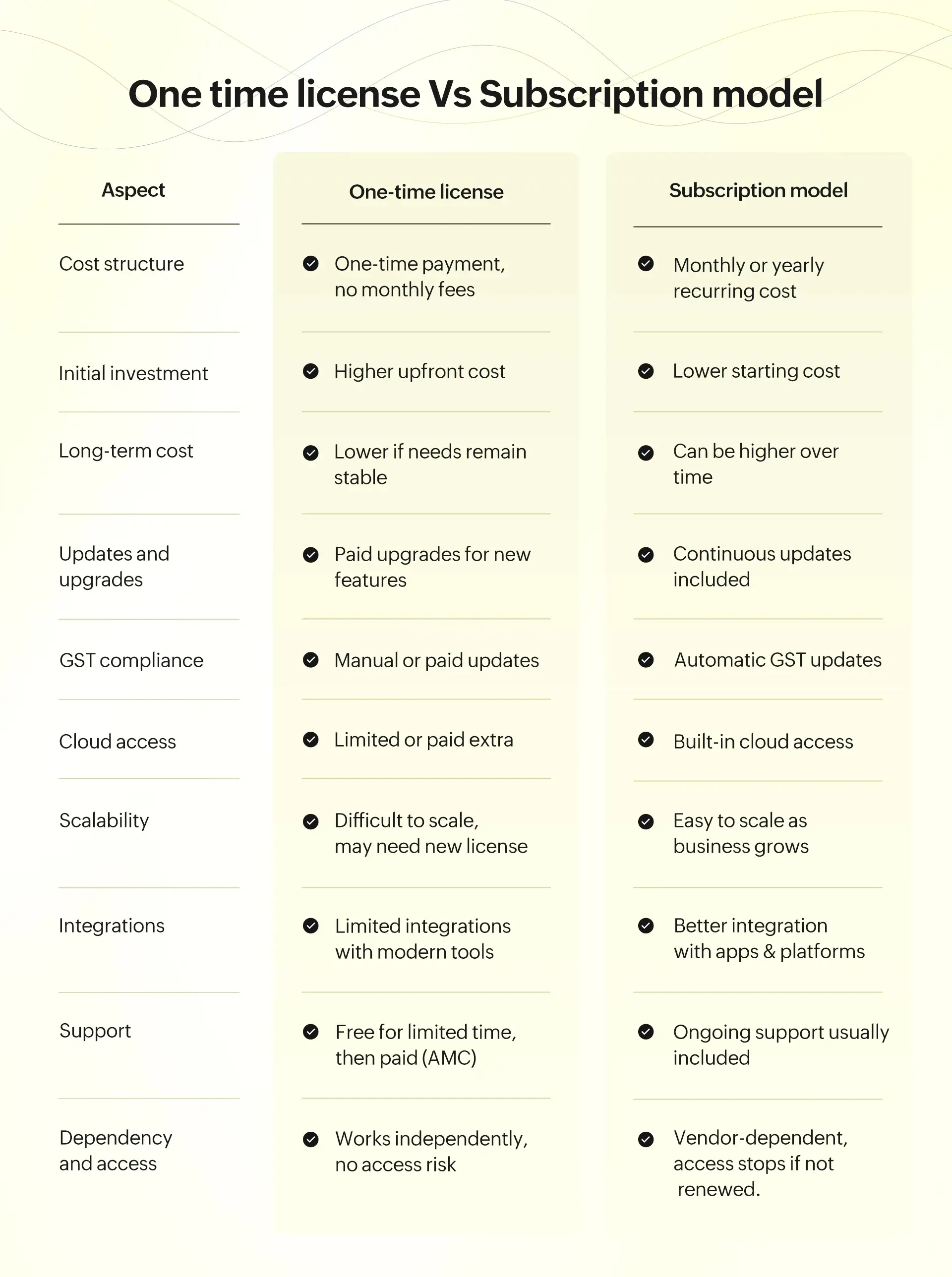
This is one of the biggest decisions retailers face while choosing billing software. At first, it looks simple: Pay once and be done. Or pay monthly and stay current. But in reality, this decision affects your cost, flexibility, and future growth.
One-time license model
This model is the traditional approach in Indian billing software. You pay a fixed amount, install the software on your system, and it is yours to use.
The advantages
- No recurring monthly payment: You don’t have to worry about paying every month. This feels comfortable, especially for small businesses.
- Lower long-term cost: If your business needs don’t change much, this can be economical over time.
- Works independently: Most one-time software works without depending on a continuous vendor connection or internet.
- Better control over data: Your data is stored locally in your system, giving you direct access and control.
- Suitable for stable businesses: If your operations are simple and not changing frequently, this model works fine.
- No risk of access loss: Even if you stop interacting with the vendor, the software usually continues to work.
The limitations
- Paid upgrades for new features: Whenever there is a new version or feature, you often need to pay again.
- Paid support after an initial period: Most vendors provide free support only for 1 year. After that, you need to pay AMC (Annual Maintenance Charges).
- Limited cloud access: Modern features like mobile access, cloud backup, or remote monitoring are usually not included or cost extra.
- Software can become outdated: GST rules, technology, and business needs change regularly. Without updates, your software may fall behind.
- Higher upfront investment: You need to spend a bigger amount at the beginning compared to subscription models.
- Difficult to scale: If your business grows in terms of more users and more stores, you may need to buy a higher version or new license.
- Limited integrations: Connecting with ecommerce platforms, payment apps, or other tools can be difficult or expensive.
While a one-time license can feel safe, if your store grows and needs anything from a second counter to a second location, or you want more features like mobile access, the limitations here can start costing you more over time.
Subscription model
This model is becoming more popular among modern retailers. Instead of paying a large amount upfront, you pay monthly or yearly to use the software. As long as the subscription is active, you get access to all features, updates, and support.
The advantages
- Continuous updates and improvements: You always get the latest features without doing anything. The software keeps improving in the background.
- Free upgrades included: Unlike one-time software, you don’t have to pay separately for new versions or feature updates.
- Automatic GST compliance: GST rules change frequently. In subscription models, updates are handled automatically, so you stay compliant without extra effort.
- Built-in cloud access: You can check sales, stock, and reports from anywhere using your mobile or laptop. This is very useful for business owners who are not always at the shop.
- Lower initial investment: You can start with a small monthly cost instead of paying a big amount upfront. This makes it easier for new businesses.
- Easy to scale as you grow: You can add more users, billing counters, or even new stores without changing the entire system.
- Better integration with modern tools: Subscription platforms typically connect easily with online stores, payment systems, delivery apps, and analytics tools.
- Vendor-managed maintenance: You don’t have to worry about backups, updates, or technical issues. The vendor takes care of everything.
The limitations
- Ongoing cost: You need to pay regularly (monthly or yearly), which becomes a fixed business expense.
- Higher long-term cost: Over many years, the total cost may be higher compared to a one-time license.
- Dependency on vendor: You depend on the software provider for access, updates, and support.
- Access stops if not renewed: If the subscription is not renewed, your access to the software and features may be restricted.
- Requires internet: Most subscription software is cloud-based, so a stable internet connection is important for smooth usage.
A subscription model helps you stay updated, flexible, and ready for growth. You pay regularly, but in return you get a system that adapts as your business evolves rather than growth becoming a limitation.
On-premise, cloud, or hybrid billing software: A side-by-side comparison
Beyond the licensing question, you also need to decide how your billing software is deployed and where your data lives. This decision affects billing speed, internet dependency, data security, and how well the system handles high-volume days like festivals and sales events.
| Aspect | On-premise billing software | Cloud billing software | Hybrid billing software (On-premise + Cloud) |
| Billing speed | Very fast, as processing happens locally | Depends on internet speed; may slow during peak times | Fast local billing with cloud sync support |
| Internet dependency | Not required; works fully offline | Requires a stable internet connection | Works offline for billing; internet needed for full features |
| High-volume billing | Ideal for supermarkets, pharmacies, high-traffic stores | May face delays if network is slow | Handles high-volume billing efficiently with local processing |
| Data control | Full control over data within store systems | Data stored on vendor-managed servers | Data stored locally and synced to cloud |
| Data backup | Manual backup required | Automatic backup on the cloud | Automatic sync and backup between local system and the cloud |
| Remote access | Limited or not available | Access from anywhere | Remote monitoring available along with in-store control |
| Multi-store management | Complex and manual | Easy centralized control | Suitable for multi-store and growing businesses |
| Scalability | Difficult and costly to expand | Easily scalable | Scalable with both local and cloud support |
| Software updates | Manual updates or paid upgrades | Automatic updates including GST changes | Updates supported with cloud sync (may need setup support) |
| Cost structure | One-time purchase (mostly) | Subscription-based (monthly/yearly) | Slightly higher setup cost than basic systems |
| Maintenance responsibility | Handled by retailer (hardware + system) | Managed by vendor | May require vendor support for setup and maintenance |
| Vendor dependency | Minimal dependency after purchase | High dependency on vendor infrastructure | Depends on proper data synchronization and vendor support |
| System reliability | Stable and consistent performance | Depends on internet and server uptime | Reliable with continuous billing even during internet interruptions |
| Setup complexity | Simple installation | Easy to start | Initial setup may require Vendor's assistance |
Additional costs you should know before buying billing software
Many retailers compare only the billing software price in India and assume that’s the final amount. But after a few months, additional costs start appearing. That’s where most businesses feel the gap between expected cost versus actual cost.
| Cost ahead | What to know |
| GST on software (18%) |
|
| AMC after year one |
|
| Paid support calls |
|
| Upgrade charges |
|
| Data migration |
|
| Implementation fees |
|
| Add-on modules |
|
| SMS/WhatsApp costs |
|
| E-invoicing module |
|
| Hardware compatibility |
|
Always ask vendors for a total cost of ownership estimate, not just the base price. Factor in GST, AMC, support, upgrades, and likely add-ons over the first two years before comparing options.
Common mistakes retailers make while choosing billing software
Choosing the right software is not just about comparing the billing software price in or shortlisting options based on features. Here are the five mistakes that cost retailers the most.
- Not evaluating scalability from day one: Software that fits a single store today can bottleneck operations tomorrow. Switching systems later is disruptiveand expensive far more than choosing the right fit upfront.
- Ignoring support quality: When billing stops mid-rush or the GST filing deadline looms, response time matters enormously. Always verify support hours, coverage, and response before committing.
- Not clarifying the upgrade policy: Many retailers only discover upgrade costs after they need the features. Always ask questions like, What does moving to the next plan cost? and What triggers that need?
- Confusing accounting software with billing software: Accounting tools manage financial records. Billing software manages daily transactions, inventory, and store operations. These are different tools and buying the wrong one creates operational gaps.
- Fear of data lock-in: In cloud-based systems, unclear data ownership makes switching painful later. Always confirm who owns your data, in what format can it be exported, and what happens to it if you leave.
Simultaneously, local vendors may offer low-cost solutions but often lack updates, scalability, and support which can impact long-term business growth compared to established POS vendors in India.
Billing software buying checklist (Before you decide)
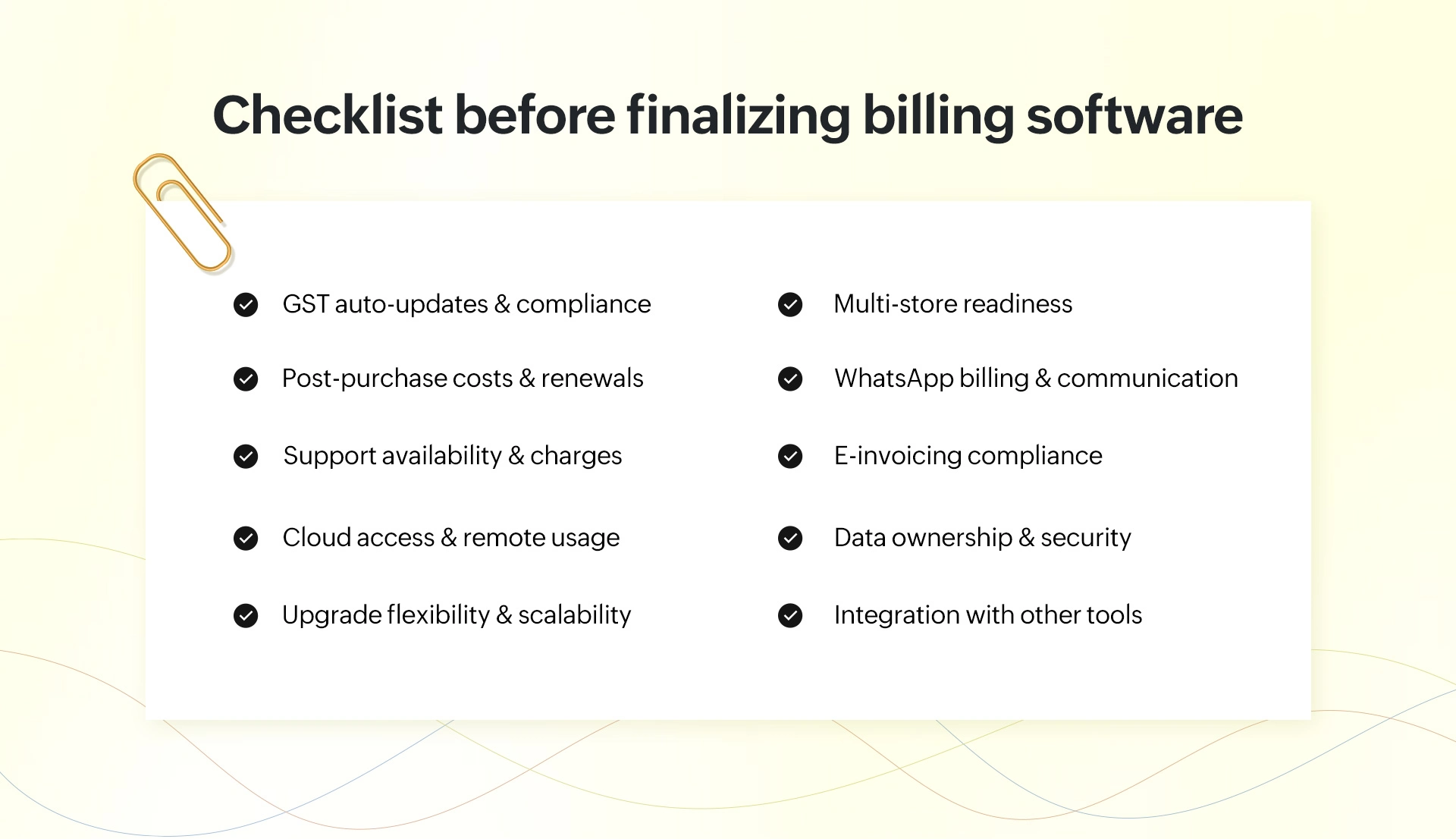
- GST update & compliance automation: Ensure the software automatically updates GST changes to avoid manual errors and compliance risks, especially when comparing GST billing software price options.
- Post-purchase costs & renewal policy: Understand what happens after 1 year, including AMC, renewal charges, and what is covered under ongoing GST billing software cost.
- Support availability & pricing: Check if support is free, paid, or limited. Reliable support is critical when evaluating POS system costs in India for daily operations.
- Cloud access & remote availability: Confirm whether cloud access is included or charged separately. This is a key factor in modern cloud billing software pricing models.
- Upgrade flexibility & future readiness: Ensure the software allows easy upgrades as your business grows beyond the initial retail billing software plan.
- Multi-store capability: Even if you are currently running a single outlet, check whether the system supports multi-store operations.
- WhatsApp billing & customer communication: Verify if WhatsApp billing and digital communication features are available, as they are becoming standard in India.
- E-invoicing & compliance readiness: Ensure the software supports e-invoicing to meet future GST requirements without major additional costs.
- Data ownership & control: Clarify who owns the data and how it can be accessed. This is especially important in cloud-based systems to avoid vendor lock-in.
- Integration with other business tools: Check whether the software can integrate with your payment systems, ecommerce platforms, accounting tools, and any other business applications you rely on.
Why growing retailers choose scalable ERP solutions
As retail businesses grow, they reach an inflection point where the retailers start looking for platforms built for scale; Gofrugal ERP is one that consistently comes up at that point. Here are some the reasons that drive Indian retailers toward Gofrugal ERP.
- Value-driven, all-in-one solution: Built for long-term reliability. Goes beyond billing to combine inventory, operations, and management in one system supported by mobile apps including GoBill, GoSure, and WhatsNow.
- Scales without disruption: Start with one store and expand to multiple outlets without changing your software or retraining your team.
- Hybrid model: Local billing speed plus cloud access. Even if the internet drops, billing continues, and data syncs automatically when connectivity returns.
- Transparent pricing and structured support: Clear pricing structures and organised support frameworks help retailers avoid the hidden costs and operational disruptions common with cheaper alternatives.
- Automatic compliance updates: GST rules and e-invoicing requirements change frequently. Gofrugal handles compliance updates automatically, so retailers stay current without manual intervention.
- Supports various industries: The platform works well across different retail industries, offering specific features for each sectors unique needs.
Garment stores: Tax slabs based on product value.
Pharmacies: Different GST rates across medicines, surgical items, and FMCG.
Supermarkets: Multiple tax slabs across food, packaged goods, and household items.
Electronics:Higher GST rates and warranty-linked billing.
Restaurants: GST without input credit, dine-in vs. takeaway billing.
Distribution:Bulk billing, input tax credit, and purchase-based GST. - Designed for the Indian market: Built specifically for the Indian market not adapted from an international product. Supports multiple retail industries and handles the compliance complexity that comes with operating a GST-registered business in India.
Billing software pricing in India is a combination of the tier you choose, the licensing model that suits your cash flow, the deployment that matches your operational reality, and the hidden costs that rarely appear in the brochure. The right billing software is not the one with the lowest price tag. It is the one that fits where your business is today and grows with you tomorrow.