You're running a business. Bills are going out, money is coming in (mostly), and you're wondering: Do I need accounting software, or is my billing software enough?
If you've searched “accounting software vs. billing software,” you've probably found plenty of articles explaining the dictionary difference but not which one your business actually needs over the other. The confusion is understandable. Both deal with money, create invoices, record transactions, and appear in the same “business software” conversation. So it's easy to assume they're two versions of the same thing.
They're not. When your software no longer matches your business needs or you choose the wrong one for your operations, you can end up with mismatched stock counts, missing accounting entries, and longer GST reconciliation. This guide explains the key differences between billing and accounting software, when you need each, whether you need both, and when an integrated solution makes more sense.
Billing software vs. Accounting software: What's the difference?
The simplest way to understand the difference is to look at the question each software is designed to answer.
Billing software answers: “Did this sale happen correctly?”
Accounting software answers: “What is the financial position of my business?”
What is billing software?
Billing software is designed to manage day-to-day sales transactions. It helps businesses create invoices, calculate applicable taxes, record payments, and maintain sales records quickly and accurately. Depending on the software, it may also support POS billing, inventory updates, barcode scanning, payment collection, customer records, and other sales-related operations. Its primary focus is the transaction.
What is accounting software?
Accounting software is designed to record and organize the financial activities of a business. In addition to sales, it can manage expenses, receivables, payables, ledgers, bank transactions, tax records, and financial statements. Its primary focus is the financial health of the business.
Why are billing and accounting software often confused?
The confusion is understandable because there is some overlap. Both may generate invoices, record payments, support GST-related processes, and provide reports.
The difference becomes clear when you look at the depth of information each system manages.
A billing system may tell you how much you sold today. An accounting system can help you understand your expenses, receivables, payables, profitability, and overall financial position.
Billing software vs. Accounting software: Complete comparison
| Aspect | Billing software | Accounting software |
| Primary purpose | Create and manage sales transactions efficiently | Maintain and manage complete financial records |
| Core functions | Invoicing, POS billing, payment recording, sales management | Ledgers, journal entries, expenses, receivables, payables, financial statements |
| Invoicing | Core function, designed for fast and frequent billing | Usually available, but not always optimized for high-volume counter billing |
| Inventory management | Often tracks stock movement in real time with sales | Typically focuses on inventory valuation and its financial impact; some platforms offer broader inventory features |
| Expense tracking | Usually limited or focused on transaction-related records | Core capability for managing business expenses |
| Payment tracking | Tracks paid, unpaid, and partial invoice payments | Tracks receivables, payables, bank transactions, and other financial entries |
| Reports and insights | Sales, transaction, and payment reports | P&L, balance sheet, expense, receivable, payable, and profitability reports |
| GST and tax | Calculates applicable GST on invoices and maintains transaction-level tax data | Organizes tax and accounting data for broader reporting, reconciliation, and compliance processes |
| Typical users | Cashiers, billing staff, sales teams, store managers | Business owners, accountants, finance teams, CAs |
| Integrations | POS hardware, barcode devices, payment solutions, customer communication tools | Banking, tax-related systems, financial tools, and other business systems |
| Scalability | Primarily scales with transaction and operational volume | Primarily scales with financial and accounting complexity |
| Best suited for | Businesses focused on sales and daily operations | Businesses that need complete financial visibility |
The quick takeaway
If your biggest challenges are fast billing, accurate invoicing, payment collection, and real-time sales-related stock updates, billing software addresses those needs.
If your challenges are expenses, receivables, payables, ledgers, profitability, and financial reporting, accounting software becomes important.
For many growing businesses, the question eventually isn't whether to use one or the other. It is whether to manage them as separate systems or as connected functions within one platform.
Can billing software replace accounting software?
Usually, no.
Billing software can manage sales transactions, invoices, payments, and related operational information. But businesses that need complete financial records generally require accounting capabilities as well.
For example, a billing system may tell you:
- How much you sold today
- Which products sold
- How much customers paid
- Which invoices are pending
- How much stock moved through sales
Accounting capabilities can help you additionally understand:
- How much you spent
- What you owe suppliers
- What customers owe you
- Your operating expenses
- Your profit and loss
- Your financial position
- Your accounting records for tax and financial reporting
So the question isn't simply: “Which software is better?”
It is: “What does my business need to manage today, and what will it need as it grows?”
Do you need billing software, accounting software, or both?
There is no single answer for every business. Your requirements change as your operations become more complex.
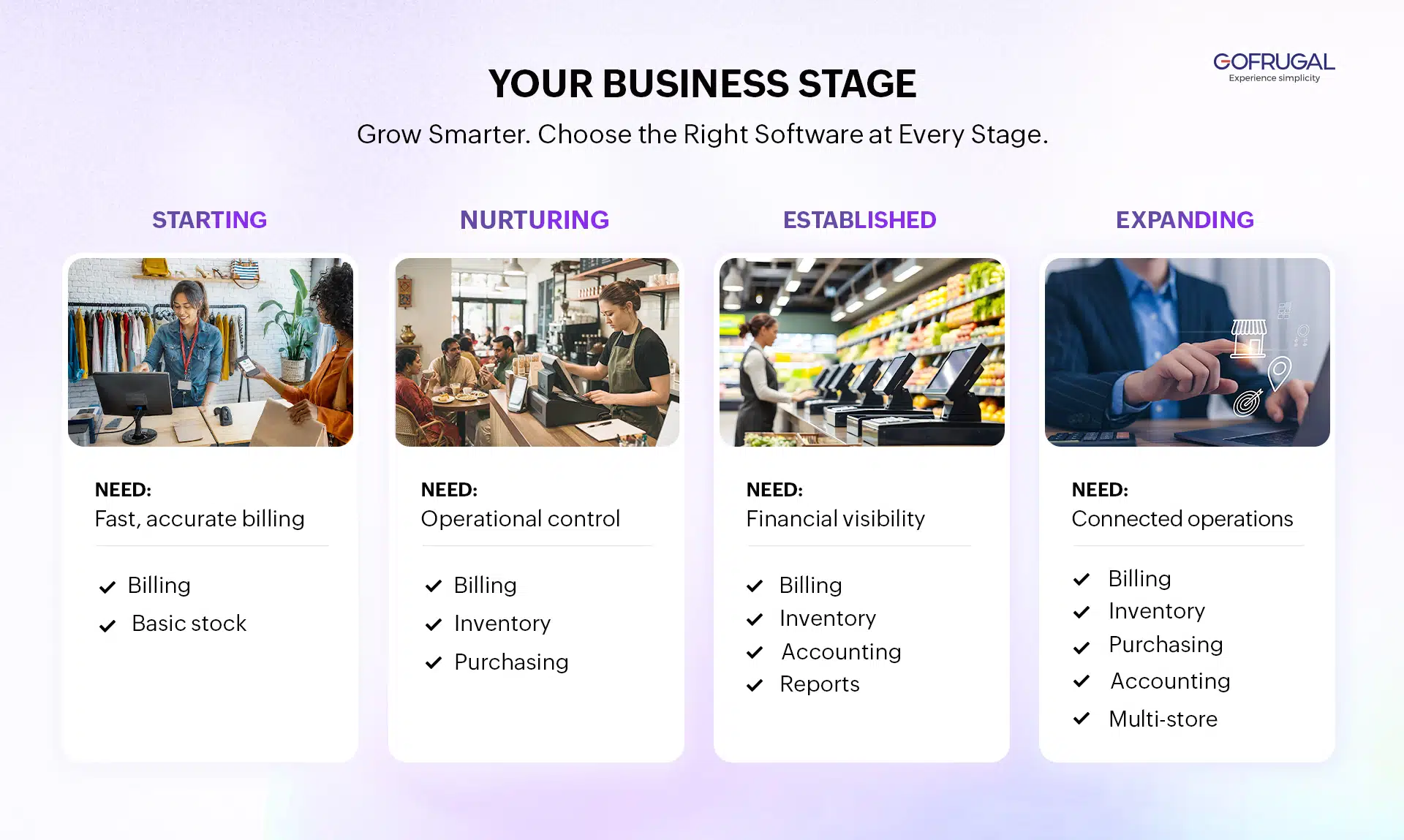
Stage 1: Starting a business
Your priority: Get sales and billing right.
When you're starting out, your daily needs may be relatively straightforward. You need to generate proper invoices, calculate GST accurately, record payments, and keep track of the products you're selling.
Manual billing can be slow and prone to errors, while basic stock tracking can become difficult as transactions increase.
At this stage, billing software may be enough if your primary requirement is managing sales and day-to-day transactions. However, if your business already has significant expenses, credit transactions, financial reporting, or other accounting requirements, accounting capabilities may be necessary from the beginning.
Stage 2: Nurturing business
Your priority: Control inventory, purchases, suppliers, and costs.
As your product range and transaction volume increase, billing is no longer your only operational concern.
You may now be dealing with:
- Multiple suppliers
- Purchase orders
- Increasing stock levels
- Fast-moving and slow-moving products
- Customer credit
- Supplier dues
- Increasing operating expenses
At this point, billing software alone may start to feel incomplete.
You need better visibility into what you're buying, what you're selling, what you have in stock, what you owe, and what you're earning.
This is often the stage where businesses start looking for inventory management and accounting capabilities alongside billing.
Stage 3: Established business
Your priority: Understand profitability and manage financial operations.
Once multiple people are involved in sales, purchasing, and finance, business information becomes more difficult to manage manually.
You may need to answer questions such as:
- Which products or categories generate the best margins?
- How much are we spending each month?
- What are our outstanding receivables?
- What do we owe suppliers?
- Are expenses increasing?
- Are we actually profitable?
Sales reports alone cannot answer all these questions.
This is where integrated billing and accounting become increasingly valuable. When sales transactions and financial records are connected, information doesn't have to be entered repeatedly into separate systems.
Stage 4: Expanding business
Your priority: Manage multiple operations from one connected view.
As your business expands across multiple outlets, managing each location separately becomes increasingly difficult.
You may need:
- Centralized inventory visibility
- Stock transfers between outlets
- Centralized purchasing
- Consolidated sales reports
- Financial visibility across locations
- Head-office control
- Standardized processes across stores
At this point, the decision is no longer simply billing versus accounting.
The bigger question becomes:
Can your software connect billing, inventory, purchasing, accounting, and multi-store operations in one system?
An integrated retail management platform like Gofrugal can eliminate the need to manually connect separate systems as your business grows.
What happens when billing and accounting software are separate?
Using separate software isn't automatically a problem. It becomes a problem when the systems don't exchange information reliably.
For example, imagine your store uses one system for billing while your accountant maintains financial records in another.
Every sale may need to be transferred or reconciled. Purchase information may need to be entered again. Stock values may need to be compared with accounting records.
Over time, this can create:
- Duplicate data entry – The same transaction may need to be entered into multiple systems.
- Data mismatches – Sales, inventory, receivables, payables, and accounting records may show different numbers if data isn't synchronized correctly.
- More reconciliation work – Your team or accountant may spend additional time comparing records and finding discrepancies.
- Delayed financial visibility – If operational and financial information isn't connected, it can take longer to understand the current financial position of the business.
- Greater difficulty as you scale – The more transactions, suppliers, employees, and outlets you add, the more difficult manual coordination becomes.
The problem isn't necessarily that you have two software systems. The problem is when those systems operate as disconnected sources of truth.
Don't choose software only for today
Choosing software based only on your current requirements can create problems later. A business that starts with a simple billing requirement may eventually need inventory management, purchasing, customer credit, accounting, reporting, and multi-store management.
Before choosing software, consider not only what you need today, but also what could change in the next stage of your business.
Common mistakes businesses make
- Choosing the cheapest billing tool without checking its future capabilities
- Selecting software based only on what another business uses
- Assuming accounting can always be added later without considering data migration
- Running billing, inventory, and accounting separately without checking how they integrate
- Choosing software that works for one outlet but cannot support expansion
Outgrowing software can involve more than purchasing a new subscription. It can mean migrating historical data, retraining employees, changing processes, and running multiple systems during the transition.
Why scalability matters
The right software should support your business as transaction volume and operational complexity increase.
Instead of replacing systems every time your business reaches a new stage, look for software that can expand from daily billing to connected inventory, purchasing, accounting, reporting, and multi-store management.
How to choose the right software for your business
Instead of comparing feature lists alone, start by identifying the problem you need to solve. Ask yourself:
What are my biggest operational challenges?
If your main problems are slow billing, invoicing errors, payment tracking, or sales-related stock updates, billing software may address your immediate needs. If you struggle to understand expenses, profitability, receivables, payables, or financial records, accounting capabilities become more important.
Do I need only billing, or do I need financial visibility too?
A business that only needs to process transactions has different requirements from one that needs complete financial reporting.
How many products and transactions do I manage?
As product variety and transaction volume increase, inventory management, purchasing, and reporting requirements usually become more important.
Do I plan to add more outlets?
If expansion is likely, check whether the software can support multiple locations, centralized management, stock transfers, and consolidated reporting.
Can the software grow with my business?
Don't just ask whether it can solve today's problem. Check whether it can support the next stage of your business without forcing you to replace your entire system.
Billing vs. Accounting software: Which one do you need?
| If your business is | You most likely need |
| Just starting and primarily focused on daily sales | Billing software |
| Growing with more products and suppliers | Billing + inventory management |
| Managing expenses, receivables, payables, and financial records | Billing + accounting capabilities |
| Managing a team and needing profitability insights | Integrated billing and accounting |
| Expanding across multiple outlets | Integrated retail management platform |
The important point is that your software requirement should evolve with your business.
Why choose Gofrugal for billing, inventory, and accounting?
As your business grows, billing, inventory, purchasing, and accounting become increasingly connected.
A sale affects stock. A purchase affects inventory and supplier dues. Expenses affect profitability. Multiple outlets affect both operational and financial reporting. Managing each function in isolation can create more manual work and make it harder to maintain a consistent view of your business.
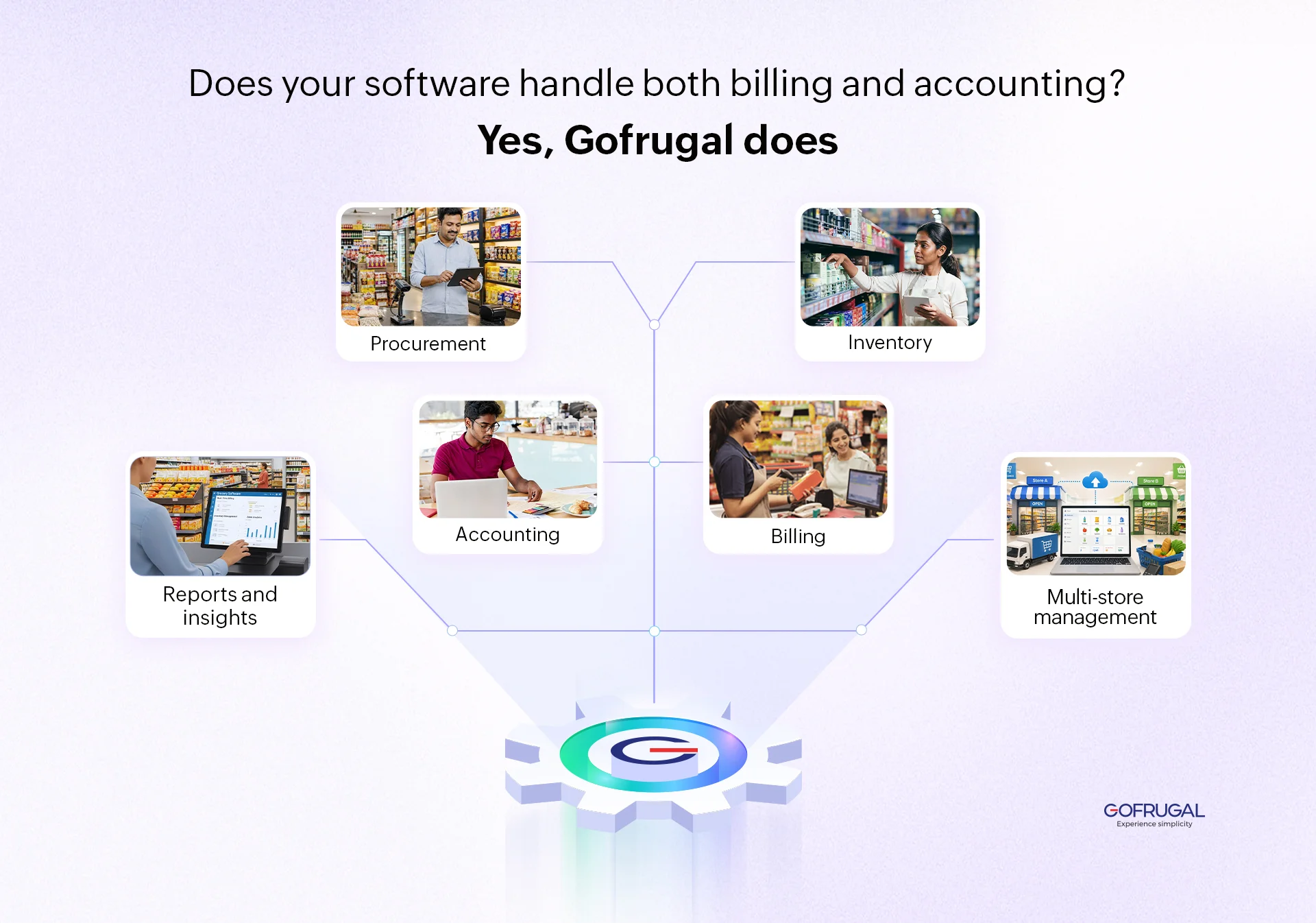
Gofrugal brings these retail operations together in one connected platform, helping businesses manage their day-to-day operations while gaining broader financial and business visibility.
One connected system for retail operations
- Billing and accounting: Connect sales transactions with accounting records to reduce duplicate data entry.
- Inventory management: Track stock movement as sales and purchases happen across outlets.
- Procurement and purchase management: Manage purchasing and supplier-related processes alongside inventory and sales.
- Business reports and insights: Get visibility into sales, inventory, expenses, and business performance.
- Multi-store management: Manage multiple outlets with centralized visibility and control.
- Reduced manual work: Connect business processes so teams spend less time entering and reconciling the same information.
The advantage isn't simply having more features. It's having billing, inventory, purchasing, accounting, and business operations work together as your retail business grows.
Concluding thoughts
Billing software and accounting software aren't competing versions of the same tool. They solve different business problems.
As your business grows, you may need both capabilities. The important decision is whether those capabilities will remain disconnected or work together in a connected system.
If you're moving beyond basic billing and need to connect sales, inventory, purchasing, accounting, reporting, and multiple outlets, an integrated retail management platform can give you the foundation to grow without constantly changing systems.