Somewhere in your store right now, there's a gap.
It's the gap between what your inventory records says you have and what's actually sitting on your shelves. It's the customers who just walked out because the product they wanted showed "in stock" on your billing screen but not in reality. It's the staff member who spent three hours last weekend counting stock instead of serving customers.
You didn't create this gap on purpose. It grew slowly, one spreadsheet update, one missed stock entry, one manual purchase order at a time. By the time most retailers notice it, they've already accepted it as "just how retail works." It isn't. This blog post is here to show you exactly why it happens and what to do about it.
Why inventory problems are growing, not going away
Inventory is genuinely harder to manage today than it was a few years ago. More SKUs, faster customer expectations, constant price changes, seasonal demand swings, multiple suppliers, multiple stores, online plus offline sales, promotions that drain stock overnight, and simply more transactions happening every day. Each adds a little friction. Together, they're exactly why manual processes such as spreadsheets, registers, and end-of-day updates stop working as a business grows. That's the gap automated inventory management exists to close.
What is automated inventory management?
Automated inventory management is a system where your stock count updates automatically the moment something happens to it, such as a sale, a return, or a new delivery, instead of someone keying the event in manually afterward.
Here's how that plays out as one continuous loop, not a one-time update.
You raise a purchase order with your supplier. When the goods arrive, they're received and checked against that order. A quick barcode scan during receiving instantly adds the correct quantity to your inventory without manual counting or data entry. Later, when a customer buys that product at the billing counter, the sale automatically reduces the stock count in real time. Once stock for that item drops below a level you've set, the system fires a low-stock alert and generates a reorder recommendation that tells you what to buy and how much, based on actual sales, not guesswork. Approve it, and a fresh purchase order goes out and the loop starts again.
That's the entire point: Your stock numbers are never stale. They reflect reality at every stage, automatically, without someone chasing updates by hand.
When do you actually need an automated inventory management system?
Not every retailer needs to automate on day one. But most retailers reach a point where the signs are hard to ignore. Go through this checklist honestly and see how many of these sound familiar.
- Inventory records rarely match your physical stock count.
- Staff spend hours every week manually counting inventory.
- You frequently run out of fast-selling products right when demand peaks.
- Slow-moving products sit in storage, tying up cash and shelf space.
- Purchasing decisions are based on gut feelings, not sales data.
- Managing stock across multiple stores feels like running separate businesses.
- You can't pull a real-time inventory report when you need one.
- Your business has outgrown spreadsheets or basic billing software.
Two or three of these checked off means inventory is managing you, not the other way around. That's where inventory management software stops being optional.
How automated inventory management solves these challenges
Mapped directly to the problems above, automation keeps stock accurate through real-time updates on every transaction, prevents stockouts with low-stock alerts and reorder suggestions, flags slow-moving and dead stock early through aging reports, replaces hours of manual counting with fast mobile and barcode-based stock checks, gives you one centralized view across every store instead of separate reports per location, automates replenishment against reorder levels you set once, and tracks batch and expiry-sensitive stock to cut down avoidable losses.
10 features to look for in automated inventory management software
This is the part that actually matters when you're evaluating a system because "automated" means very different things depending on what's under the hood. Here are 10 features a genuine automated inventory management software should deliver.
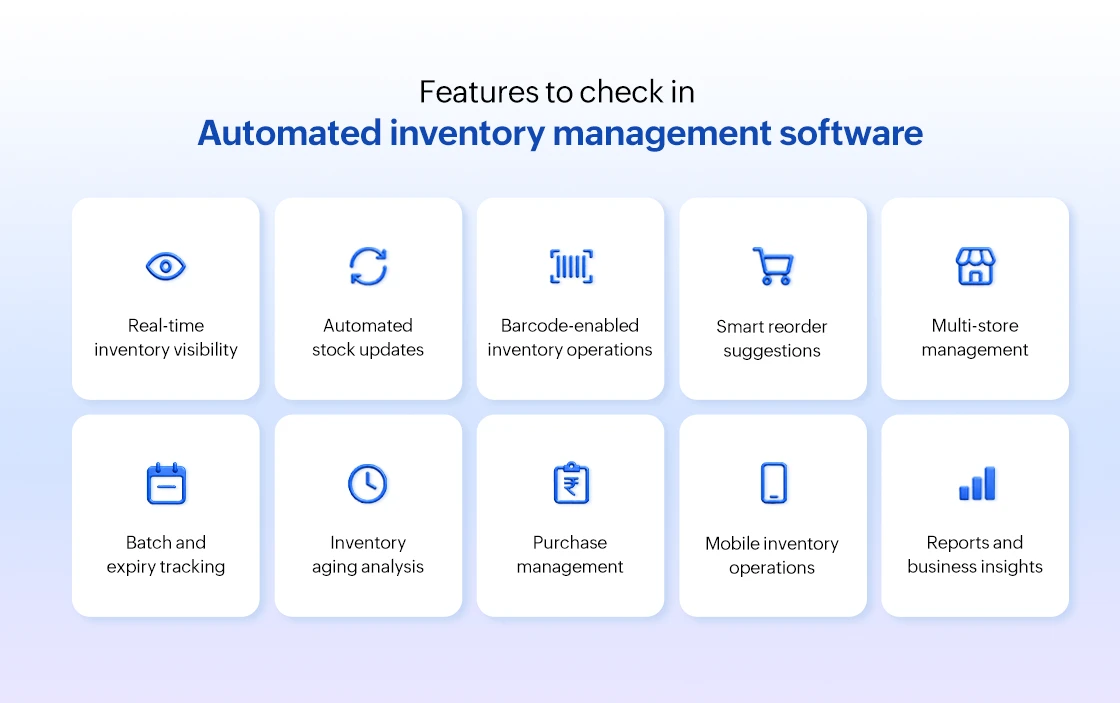
- Real-time inventory visibility: You should be able to check exact stock levels for any product, at any store, at any moment and not "as of last night's update." Real-time visibility is what makes every other feature on this list actually useful.
- Automated stock updates: Every sale, return, transfer, and stock receipt should adjust your inventory count on its own. If your team is still manually keying in adjustments after transactions, the system isn't automated, it's just digital.
- Barcode-enabled inventory operations: From receiving goods to billing and stock counts, barcode scanning should run through every stage. It's what removes manual entry errors and speeds up operations that used to take hours.
- Smart reorder suggestions: The system should look at actual sales velocity, not fixed formulas, and tell you what to reorder, how much, and when, based on how fast each product is actually moving.
- Multi-store inventory management: If you run more than one location, you need a single dashboard showing stock across all of them, not separate systems or spreadsheets you have to manually consolidate.
- Batch and expiry tracking: For categories like pharmacy, FMCG, and grocery, your software should track batch numbers and expiration dates automatically, flagging near-expiry stock before it becomes a write-off.
- Inventory aging analysis:This shows you exactly how long stock has been sitting unsold, so slow-movers get identified and acted on well before they turn into dead stock.
- Purchase management: From raising a purchase order to recording goods received, purchase management should be one connected flow, not a separate process disconnected from your inventory data.
- Mobile inventory operations: Stock checks, counts, and lookups should be possible from a mobile inventory app not just from a back-office computer.
- Reports and business insights: Beyond raw numbers, the system should surface insights you can act on fast-movers, slow-movers, reorder patterns, and stock value so decisions are backed by data, not instinct.
If a system you're evaluating is missing more than two or three of these, it's likely a digitized version of manual work not true automated inventory control software.
5 benefits of having automated inventory management software
- Improve inventory accuracy: Every sale, purchase, return, and stock transfer updates inventory in real time, keeping your system aligned with what's actually on your shelves.
- Prevent stockouts before they happen: Low-stock alerts and smart reorder suggestions help you replenish fast-moving products before they run out, reducing missed sales opportunities.
- Save hours of manual inventory work: Barcode-enabled stock counting, automated updates, and digital inventory operations reduce the time your team spends on repetitive inventory tasks.
- Manage multiple stores from one place: Track inventory across all your stores and warehouses through a centralized system, without separate reports or spreadsheets.
- Make faster, data-driven inventory decisions: Access real-time inventory reports, stock movement trends, and demand insights to purchase, replenish, and allocate inventory with confidence.
How inventory automation improves profitability
Saving time is valuable, but profitability is what drives business decisions. Here's how inventory automation directly improves your bottom line.
- Free up working capital: Reduce excess inventory by purchasing based on actual demand, keeping more cash available for growth and day-to-day operations.
- Lower inventory carrying costs: Identify aging and slow-moving stock early, helping reduce storage costs, depreciation, and unnecessary inventory holding.
- Reduce inventory losses: Real-time tracking and barcode-based operations help minimize shrinkage, stock discrepancies, and costly inventory errors.
- Increase inventory turnover: Move inventory faster, reduce dead stock, and make better use of shelf space, allowing the same investment to generate more sales.
- Protect profit margins: Smarter purchasing, lower inventory losses, and optimized stock levels help improve margins while reducing unnecessary operational costs.

How Gofrugal helps you automate inventory management and why it's built differently
Every challenge you've read about so far has a direct solution in Gofrugal. The platform is built for retailers and is engineered for Indian retail specifically, not adapted from a global template.
- Real-time accuracy across every transaction:Billing, purchasing, transfers, and returns all update your inventory instantly across every store so your system and your shelves always agree; a transfer between locations reflects on both ends immediately.
- Smart reorder suggestions that prevent stockouts: Recommendations are generated from actual stock levels and sales history, not manual tracking, so fast-movers get replenished before they run out.
- Aging reports that catch dead stock early: Movement analysis flags slow-moving stock while there's still time to act through a promotion, a transfer, or a return before it becomes a write-off.
- Barcode-first mobile operations: From goods receipt to billing and stock counts, barcode scanning runs through every stage via mobile apps your staff already know how to use, turning audits that used to take hours into a fast, low-error process.
- One centralized view across stores and warehouses: Whether it's inventory visibility or warehouse-to-store transfers, everything is tracked end-to-end from a single dashboard and no separate reports or reconciling what's "in transit."
- Purchasing backed by real insights:Reports and demand trend data replace assumptions with evidence, so procurement decisions are data-driven at every stage.
- Built for how Indian retail actually runs: Native GST and compliance workflows, and the ability to keep billing and inventory running even without a stable internet connection with everything syncing automatically once you're back online.
Where to go from here
If the challenges in this article felt familiar, your business has likely outgrown manual inventory management. The good news? It's a problem that's easy to solve with the right system. Automated inventory management gives you real-time stock visibility, reduces manual work, prevents costly stockouts, and helps you make smarter purchasing decisions, all from a single platform. That's exactly what Gofrugal delivers. Whether you operate one store or many, you can manage inventory with greater accuracy, efficiency, and confidence.
Frequently asked questions
How does automated inventory management work?
Automated inventory management works by automatically updating your stock count every time a transaction happens as a sale, purchase, return, or transfer using barcode scans, connected billing, and purchase systems. This removes the need for manual stock entry and keeps your inventory data accurate in real time.
Why is inventory automation important for retailers?
As product ranges, sales channels, and store locations grow, manually tracking stock becomes error-prone and time-consuming. Inventory automation reduces these errors, saves staff time, and gives retailers accurate, real-time data to make faster, better decisions.
Can automated inventory management reduce stockouts?
Yes. Automated systems track stock levels continuously and send low-stock alerts along with reorder suggestions based on sales velocity, so you can restock fast-moving products before they run out.
How does inventory automation improve inventory accuracy?
By updating stock automatically after every transaction, instead of relying on end-of-day manual entries, automation eliminates the delays and human errors that typically cause mismatches between recorded and actual stock.
Can automated inventory software manage multiple stores?
Yes. Good inventory automation software offers a centralized, real-time view of stock across all your store locations and warehouses, so you can manage everything from one dashboard instead of checking each store separately.
Does automated inventory management help reduce excess inventory?
Yes. Through inventory aging reports and movement analysis automated systems highlight slow-moving and excess stock early, giving you time to act through promotions, redistribution, or adjusted purchasing before it turns into dead stock.
How does Gofrugal automate inventory management?
Gofrugal automates inventory through real-time stock updates across billing, purchasing, and transfers; smart reorder suggestions based on sales history, mobile barcode-enabled stock counting, and centralized multi-store inventory visibility, all backed by detailed reports and insights.
What's the difference between inventory management software and automated inventory management?
Inventory management software is used to record and organize stock data, but it often still requires manual updates. Automated inventory management goes a step further as it updates stock levels on its own after every transaction, reducing manual work and human error.
Does automated inventory management replace staff, or just reduce their manual work?
It doesn't replace staff. It removes repetitive manual tasks like stock counting and register updates, freeing your team to focus on customer service, sales, and other higher-value work.
How much does automated inventory management software cost for a small retail store in India?
Costs vary depending on the number of stores, users, and features you need. Most providers, including Gofrugal, offer plans suited to small retail stores as well as larger multi-store businesses. It's best to request a personalized quote based on your specific requirements.
Can automated inventory management software integrate with my existing billing or accounting system?
Most modern inventory automation platforms, including Gofrugal, are designed to integrate with billing and accounting systems, ensuring stock, sales, and financial data stay in sync without duplicate manual entry.
How long does it take to set up automated inventory management for a retail store?
Set-up time depends on your store size, number of SKUs, and existing data. Single-store setups can often be completed within a few days, while multi-store or more complex inventories may take a bit longer to fully configure and migrate.