5 ways to manage perishable and shelf-stable inventory together
Discover how to manage perishable and shelf-stable items together using an integrated inventory management approach. Learn how to overcome storage conflicts, avoid expiry and spoilage, rotate stock, and ensure efficient perishable goods inventory management.
Request a callback
Highly rated and trusted by customers!







Key features
Key takeaways
- Learn why perishables and shelf-stable items can't be stored together and understand the challenges of storing both at one location.
- Find out best practices for managing perishables and shelf-stable items, and the benefits of integrated inventory management.
- Explore how Gofrugal's retail software features and solutions help manage inventory efficiently.
Challenges of managing perishable and non-perishable items together
Managing perishable and non-perishable items together causes several operational challenges. Both types of items have opposite storage and rotation needs, and need their own forecasting methods.
Complex demand forecasting
Perishables have fluctuating demand, governed by factors such as frequent price changes, weather, seasonality, and logistics costs. Shelf-stable items can become obsolete after a few weeks due to varying customer tastes. Forecasting demand for both items with the same approach will lead to supply chain issues.
Varying storage conditions
Perishables should be stored in cold conditions and frozen zones to avoid spoilage while non-perishables can be stored in ambient conditions since they are not temperature sensitive. Storing both items in the same conditions can lead to cross contamination and inefficient storage planning.
Different shelf life and expiry
Perishable goods inventory management is critical because of the short shelf life and expiry dates. They require regular monitoring, frequent stock audits, and quick replenishment to ensure reliable stock availability. Non-perishables can be stored for weeks or months without fear of expiry. Hence, they can be procured in bulk, stocked for long, and audited when needed.
Inconsistent stock rotation
Inventory management for perishable goods and non-perishable goods needs a different approach. Since perishables have short expiries, they need FEFO-based stock rotation and inventory tracking while non-perishables can follow a FIFO-based approach since expiry and spoilage is not a major concern here.
Inefficient space allocation
Perishables should be easily accessible for seamless sales and easy restocking while non-perishables can be placed in a less accessible location. Handling both items in the same location leads to congestion, inefficient rack planning, and lost sales opportunities from perishables.
Why perishable and shelf-stable inventory require different approaches
Perishable and shelf-stable items have different natures and characteristics in terms of shelf life, storage conditions, and order frequency. Managing both perishable and shelf-stable items together can lead to inefficient inventory control, poor cash flow, and revenue loss.
Perishable items have short expiry and should be stored in lower temperatures to avoid spoilage. These items need to be sold based on FEFO (first expiry, first out) approach and should be replenished frequently to avoid stockouts.
On the other hand, shelf-stable items have a longer shelf life, predictable consumption, and require flexible temperature control. They can be ordered in bulk based on economic order quantity, stored for long days, and replenished based on need.
These differences require both items to be handled with a unique approach that can help retailers maintain freshness, reduce waste, avoid stockouts, and maintain better inventory control.
How to manage perishable and shelf-stable inventory together
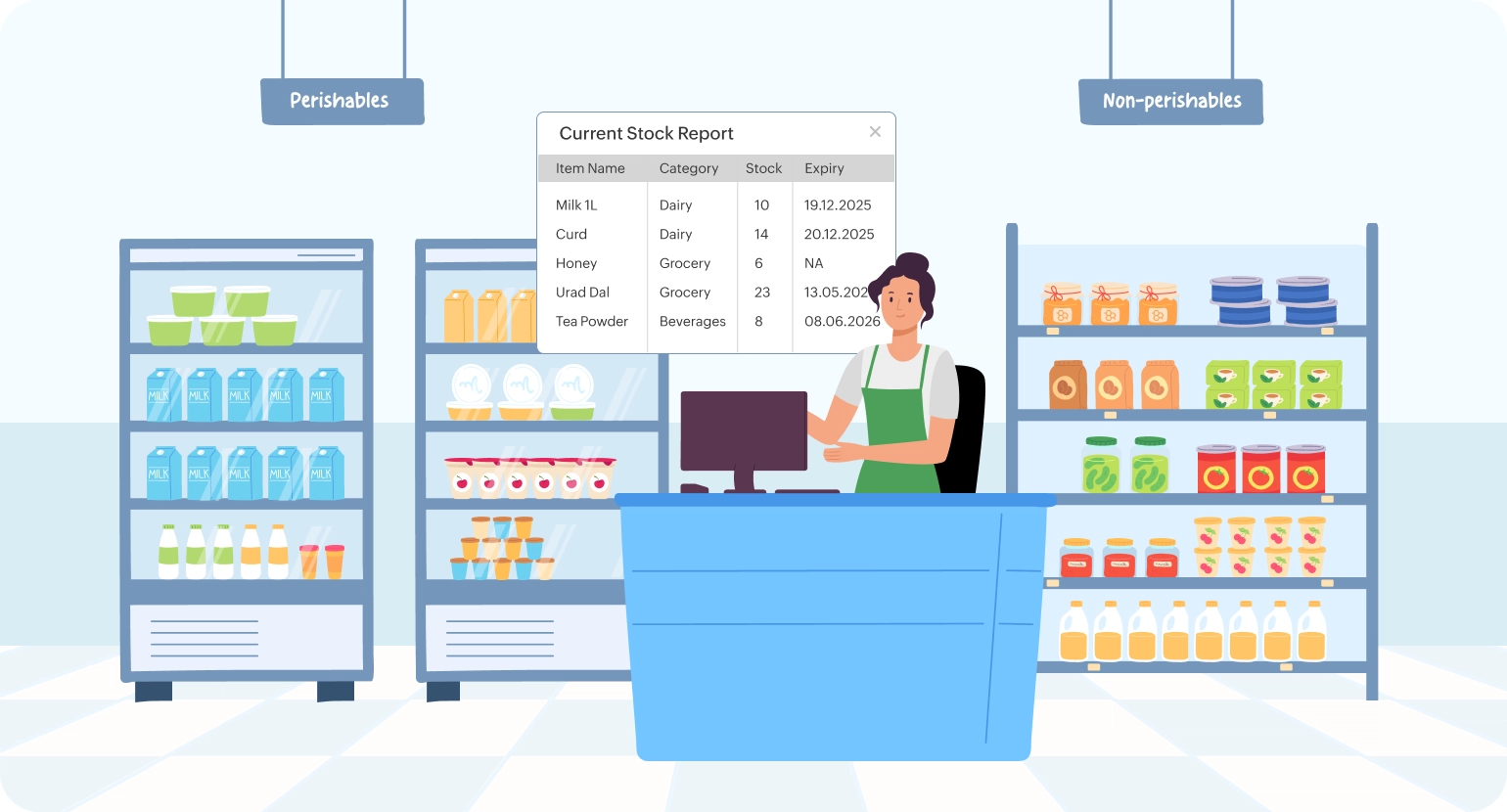
Implement FIFO/FEFO strictly
- Implement the "First Expiry, First Out" approach for perishables using batch tracking to avoid expiry and spoilage.
- Adopt the "First In, First Out" approach for non-perishables to rotate old stock first and avoid inventory carrying costs.
- Train staff to follow FIFO and FEFO approaches for relevant items and place new items behind old ones on racks and storage units.
Use category-based forecasting
- Prioritize items with ABC analysis and forecast demand considering weather, seasonality, and festivals.
- Analyze short cycles to forecast demand of fast moving perishable items and steady historical patterns for shelf-stable items.
- Place frequent small valued orders for perishables to avoid waste and bulk periodic orders for non-perishables to reduce inventory carrying costs.
Monitor shelf life and expiry
- Keep an eye on item expiry dates for efficient perishable goods inventory management and meeting food safety regulations.
- Track the shelf life of items, identify slow movers, review their current condition, and sell them as combos and kits if needed.
- Configure expiry alerts to be notified in advance and liquidate the nearing expiry items by running offers and promotions to avoid waste and returns.
Conduct regular stock audits
- Do daily stock auditing of perishables and weekly audits of fast-moving items to ensure freshness, assure stock reliability, and avoid stockouts.
- Perform category-wise or supplier-wise stock audits of shelf-stable items on a monthly or quarterly basis to review the stock count.
- Audit items after festivals, events, and seasons to keep inventory data accurate.
Set up clear storage and displays
- Maintain cold storage for perishables and dry ambient storage for shelf-stable items in distinct places with clear labels to maintain product quality.
- Ensure continuous power supply to cold storage and perform regular temperature checks on the storage to ensure freshness and avoid spoilage.
- Place perishables in easily accessible locations from counters and packing areas to avoid frequent travel back and forth.
Adopt inventory management software
- Choose a multi-store inventory management software that provides centralized inventory control with batch-wise inventory tracking and real-time stock visibility.
- Ensure the software allows to configure stock limits, reorder points, and expiry alerts to manage inventory and place purchase orders efficiently.
- It should enable easy stock auditing, picking, refilling, repacking, transfers, returns, and material inwards with minimum efforts.
Benefits of integrated inventory management
Integrated inventory management with a single, unified solution provides better inventory control, higher transparency, and enhanced efficiency. With all items tracked with a single inventory management software, there are numerous benefits retailers can enjoy. Here are a few.
Reduced expiry and waste
An integrated inventory system helps configure expiry alerts, sell items with short expiry quickly, and avoid waste due to spoilage. It tracks inventory across locations and records waste items for seamless returns and payment adjustments.
Better space utilization
Having a centralized inventory system lets you track each item's movement across outlets, analyze the current inventory, and stock per demand. It helps avoid overstocking slow-moving items and utilize the space for in-demand perishables.
Enhanced customer satisfaction
Integrated inventory management provides a uniform experience for customers both in-store and online with real-time inventory sync, price sync, and expiry updates. It enables customers to try, review, and order fresh items, thus building trust and loyalty.
Improved operational efficiency
Centralized inventory management provides real-time data on stock distribution across multiple locations and outlets ensuring high transparency, uniform data flow, and efficient stock handling across the supply chain.
Optimized reordering and replenishment
An integrated inventory system lets you monitor sales, segment them based on ABC analysis, and make informed decisions on reordering, repacking, and stock transfers. It allows you to plan order cycles for perishables and non-perishables based on demand and optimize cash flow.
How Gofrugal helps manage mixed inventory efficiently
Batch-wise inventory management
Create custom barcodes with required details such as expiry, batch number, price, and more in the desired language and format. Manage inventory centrally, handle repacking at warehouses, and manage multiple batches of inventory efficiently with built-in barcode generation.
Efficient waste and damage tracking
Record waste, damage, and expiry stock and adjust them in your inventory with real-time adjustments in accounts. Handle returns, generate credit/debit notes, and adjust customer payments easily.
Categorize stock based on hierarchy
Map items to different categories and sub-categories based on their characteristics during SKU creation. Maintain flow through, direct store delivery, and put-away items based on item flow and make informed decisions on purchases and repacking.
Automate purchases and pricing
Set supplier walk-in days, minimum and maximum stock, reorder conditions, and automate purchases. Control pricing with automatic markup and markdown settings for relevant batch, item, supplier, and categories, and protect sales margins.
Make informed business decisions
Monitor item movement based on customer, counter, location, outlet, and seasons with dedicated inventory reports to make informed decisions. Analyze fast moving and slow moving items, forecast demand, and plan your purchases efficiently.
Frequently asked questions
How can inventory software help manage perishable and shelf-stable items in a single system?
Inventory management software helps manage perishables and shelf-stable items in a single system efficiently as it:
- Lets you create masters for all items in a single system with relevant categories and sub-categories that allow you to track and identify their nature and characteristics.
- Allows you to configure item types based on their movement in the store as put away, flow through, and direct store delivery that helps define inventory flow.
- Helps manage multiple batches of items with different expiry dates efficiently using integrated barcode generation.
- Provides insights on shelf life, stock movement, sales patterns, and past purchase frequencies, allowing you to make efficient purchase decisions.
- Helps manage items in different locations and outlets with complete visibility and make stock transfers internally as needed to reduce capital investment.
How does Gofrugal POS reduce manual inventory checks for perishable items?
Gofrugal POS empowers you to perform mobile-based stock auditing even during busy business hours with quick stock reconciliation. It allows you to automate stock audit tasks based on item, category, and supplier as per importance and complete inventory checks with proper planning. The WhatsNow app and smart reports help you track current stock and item movement of perishable items from anywhere.
Can Gofrugal automate FEFO and FIFO picking for mixed inventory?
Yes, Gofrugal helps automate FEFO and FIFO picking for mixed inventory. It helps segment items based on stock movement, analyze sales, and automate purchases to suppliers based on reorder conditions. Built-in analytical business reports allow you to monitor item movement, identify near-expiry items, track fast moving items, and make informed decisions.
How do you forecast demand for perishables compared to shelf-stable goods?
The demand for perishables should be derived based on short cycles and dynamic forecasting while the demand for shelf-stable goods should be forecasted based on steady periodic historical patterns.
Can Gofrugal send alerts for expiring or at-risk perishable inventory?
Yes, Gofrugal's retail software helps configure alerts for near-expiry perishable items, create offers and combo packs, and liquidate items faster before expiry to avoid spoilage. The alerts can also be configured to staff on SMS or WhatsApp, nudging them to refill fresh stock on racks once perishable items are sold.